

godaddy
New Member
ICANN Accredited Registrar
Domain Marketplace
Domain Broker
Hosting Provider
ICA Member
ISO 27001
- Joined
- Jan 26, 2009
- Messages
- 142
- Reaction score
- 12
If you run a service-based business, a booking website can make it easier for clients to choose a service, check availability, and book an appointment without calling or messaging back and forth. It can also give them the details they need to feel confident before they commit.
This guide covers what to plan before you start, what a useful booking website should include, and how to build and launch one with Airo AI Builder. You can create a site, add booking and payment options, and connect your domain — all without starting from code.
GoDaddy Airo AI Builder
With a few prompts, Airo AI Builder generates your website, web app, pages, databases and logic in minutes — no coding required. Start for free with 50 AI credits a month. No credit card required.
Build for Free
Any business where clients schedule time with you can benefit from a booking website. It gives people one convenient place to learn about your services and request or book an appointment.
Common examples include:
The common thread is simple: if clients need to book a time slot with you, a booking website can help. Some industries have particular needs, so it can also help to look at a solution tailored to your type of business. For example, salons, spas, and other beauty businesses can explore Airo’s beauty solution.

A little preparation can make the building process faster and help you get a more useful first draft. The more clearly you can describe your business, services, and goals, the better Airo can understand what you want your website to do.
A few minutes of planning can save time later. Before you start building, think through your business description, the pages you need, and the photos you want to use.
Your business description is the starting point for an AI-built site. Be specific about what you do and what you want clients to do on your website. Include:
For example, “I offer services and want bookings” doesn’t give a builder much to work with. A more useful description might be:
“I’m a certified personal trainer in Miami. I offer one-on-one training sessions, small group sessions, and online coaching packages. I specialize in strength training for beginners, and I want clients to be able to book and pay directly on my site.”
You don’t need to have perfect marketing copy. Clear, specific details give Airo more to work with and make it easier to refine the result.
Most booking websites share a few core pages, but the right setup depends on your services and how clients make decisions. Consider starting with:
You don’t need every page on day one. Start with the essentials and add pages as your business grows. Your industry may also affect which pages are most useful.
Clients want to picture what they’re booking before they commit. Gather real photos that help them understand your service, such as:
Use real photos rather than AI-generated images or generic stock photos. For a service business, clients are choosing to spend time with a real person or team, so authentic images can help build trust. Phone photos are fine if they’re clear and well-lit.
A custom domain can help your business look professional and make it easier for clients to find and remember your website. If you’re choosing one, keep these tips in mind:
Eligible Airo AI Builder paid plans include a free custom domain*, so you may not need to purchase one separately. If you already own a domain, you can connect it during the build.
Want to see if the domain you want is available? Give it a try here:
SEARCH

When you use Airo AI Builder, the details in your prompt help shape the website it creates. Instead of describing your business in broad terms, tell Airo what you offer, who you serve, and what visitors should do.
For example, you could ask Airo:
“Build a website for my independent hair salon. Include cuts, color, and styling services with space for pricing and appointment length. Use a warm, modern style and make it easy for visitors to book online.”
“Create a website for my photography studio. I photograph families and small businesses, offer several session packages, and want visitors to inquire about availability.”
“Build a booking website for my yoga studio. Show class types and schedules, explain what new students should bring, and make it easy to reserve a spot.”
Use this checklist while you build and as a final review before your website goes live. The details may vary by business, but these basics help clients understand your services and book with confidence.
Clients want to know what’s available, how much it costs, and how long it takes before they book. Give each service a clear name and description, along with a price—or a starting price—and its duration. This helps clients choose the right option without needing to contact you for basic details.
Online booking is the core feature of a booking website. Clients should be able to choose a service, select a date and time, and confirm the appointment without a long back-and-forth. Keep the process simple and mobile-friendly, and make a prominent Book now button easy to find throughout the site.
Send clients a confirmation as soon as they book, with the appointment details they’ll need. Automated reminders before an appointment can help reduce missed bookings and make it easier for clients to remember when they’re due. Make sure your confirmation clearly explains how to get in touch if something changes.
Service businesses are personal: clients are booking time with a person, not buying a product off a shelf. Use your About page to introduce yourself, describe your background and credentials, and explain what it’s like to work with you. That context can help someone feel more comfortable booking for the first time.
Photos let clients picture the experience before they book. Show your space, examples of your work where relevant, and the person or team they’ll meet. Use real, current photos so visitors get an honest impression of your business.
Booking an appointment is a trust decision, and feedback from past clients can help people make it. Share reviews from sources such as Google, or use short quotes from messages and social media with permission. Place testimonials near your services or booking button, where they can answer questions at the moment a client is deciding.
Tell clients where the service takes place: at your business, at their location, or online. Include your hours and explain how far in advance they can book. Keep this information up to date so clients don’t choose a time based on outdated availability.
A clear policy sets expectations and can help protect your time and revenue. Explain how much notice clients need to give to cancel or reschedule, whether deposits are forfeited, and what happens if someone arrives late. Make the policy easy to find before clients confirm a booking.
Some clients will want to ask a question before they book. Include a contact form and, where appropriate, your email address and phone number. Make contact information easy to find from every page, even if most visitors book online.
Links to your social profiles give visitors another way to see your business and recent work. For many service businesses, Instagram can be an important showcase. Link only to profiles you keep active, so visitors see a current and consistent picture of your brand.
Once you have a plan, photos, and domain ready, you can start building. Airo AI Builder helps businesses—including service providers such as salons, spas, and other beauty businesses—create a website through conversation. You can describe what you need, refine the site, and set up booking and payments in the same build, without coding or a separate scheduling tool.
If you’re in the beauty industry, you can also build a booking website for your business with Airo AI Builder.
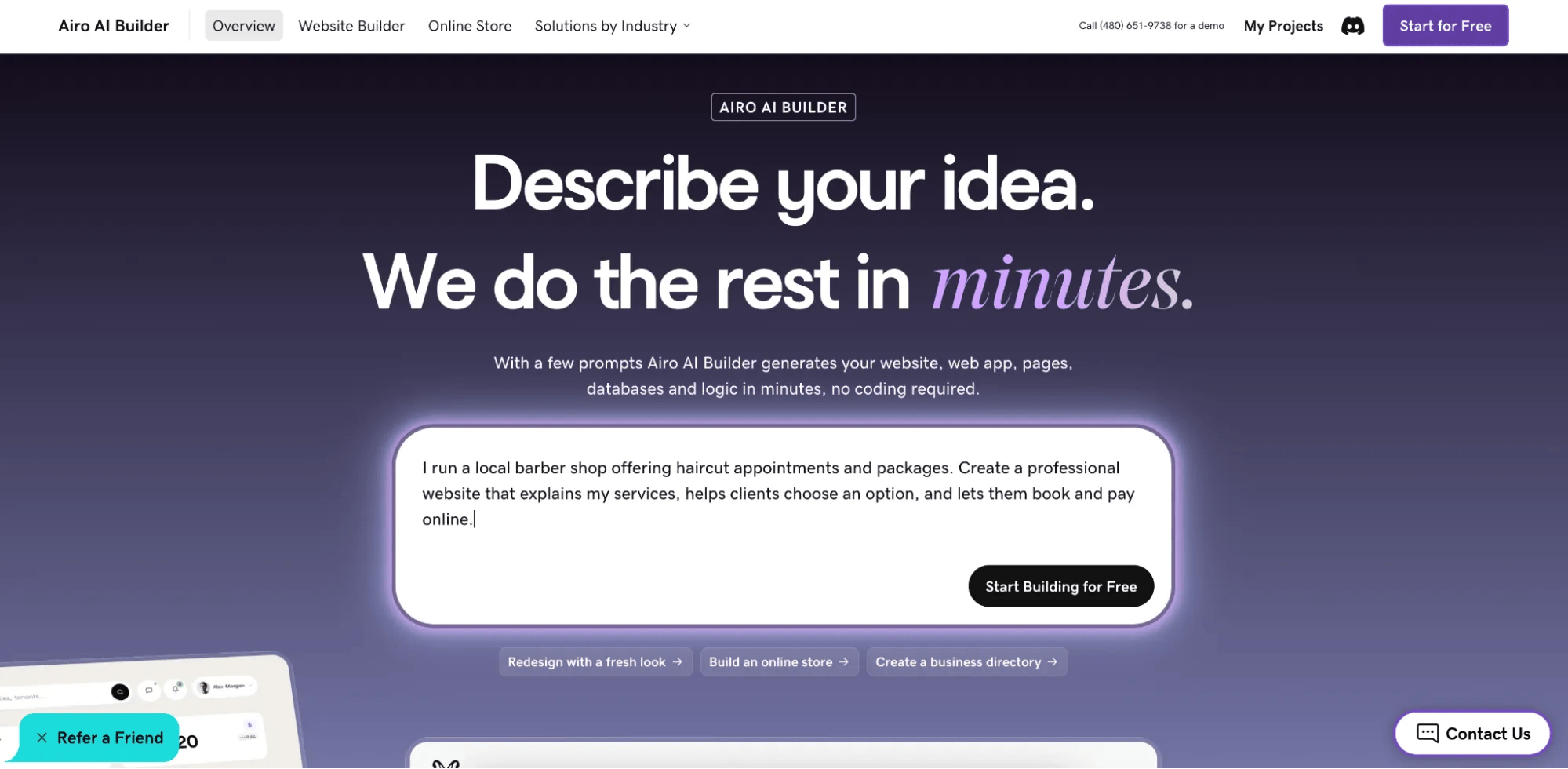
Start by telling Airo what your business does, who you serve, what services you offer, and what you want visitors to do on your site. This is where the description you prepared earlier comes in handy.
You can also attach helpful files, such as a logo or service menu, or point Airo to an existing website or social media page to use as a reference.
For example:
“I run a local barber shop offering haircut appointments and packages. Create a professional website that explains my services, helps clients choose an option, and lets them book and pay online.”
Add any details that matter to your business, such as your location, preferred style or the types of appointments you offer.
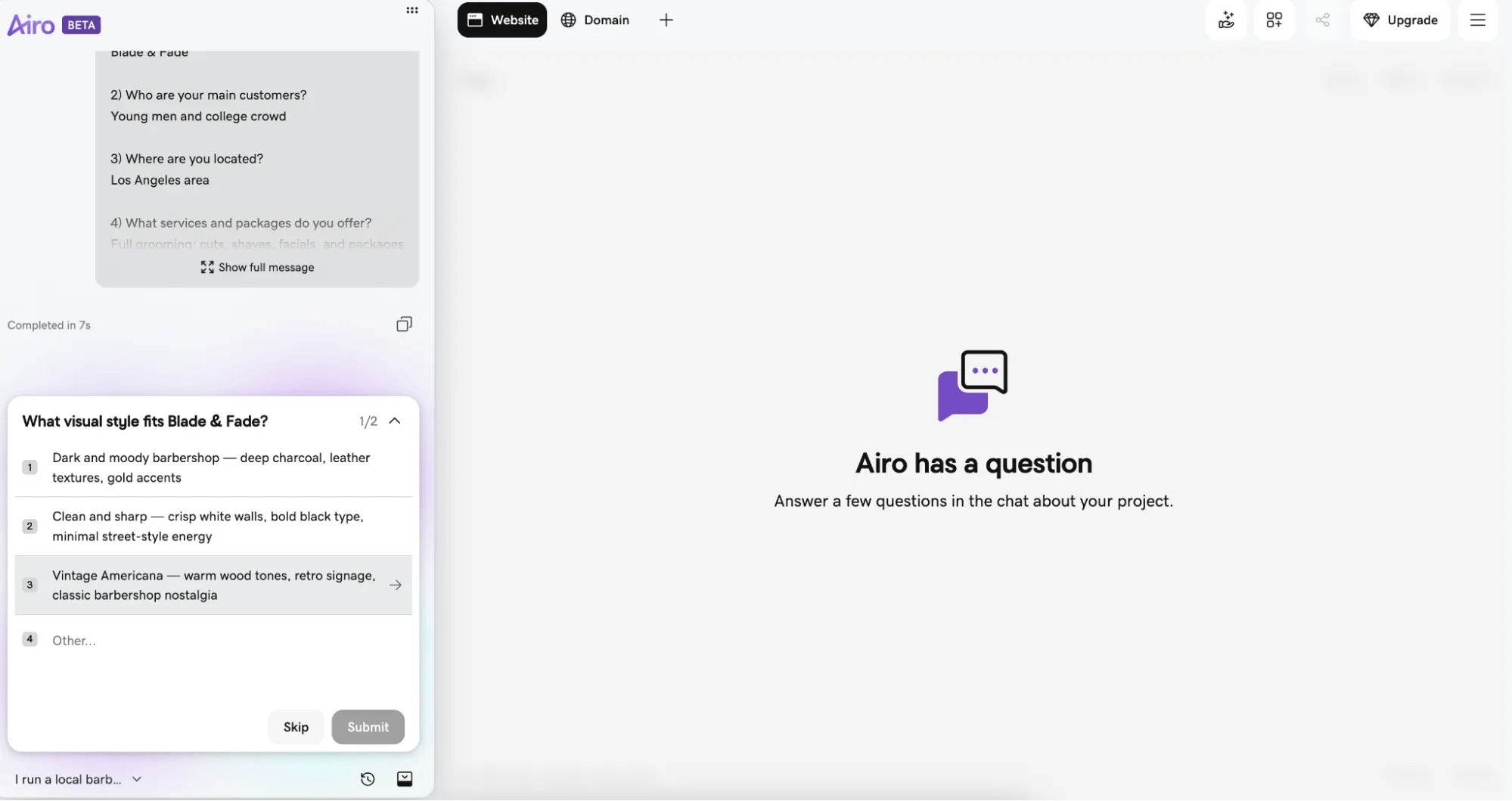
After your initial description, Airo may ask follow-up questions to refine the website. These might cover which pages to include, whether you want online booking and payments, or what visual style you prefer. It’s a short back-and-forth to clarify the build—not a lengthy questionnaire.
Answer as specifically as you can. If you’re not sure about a detail, you can start with the essentials and refine the site later.
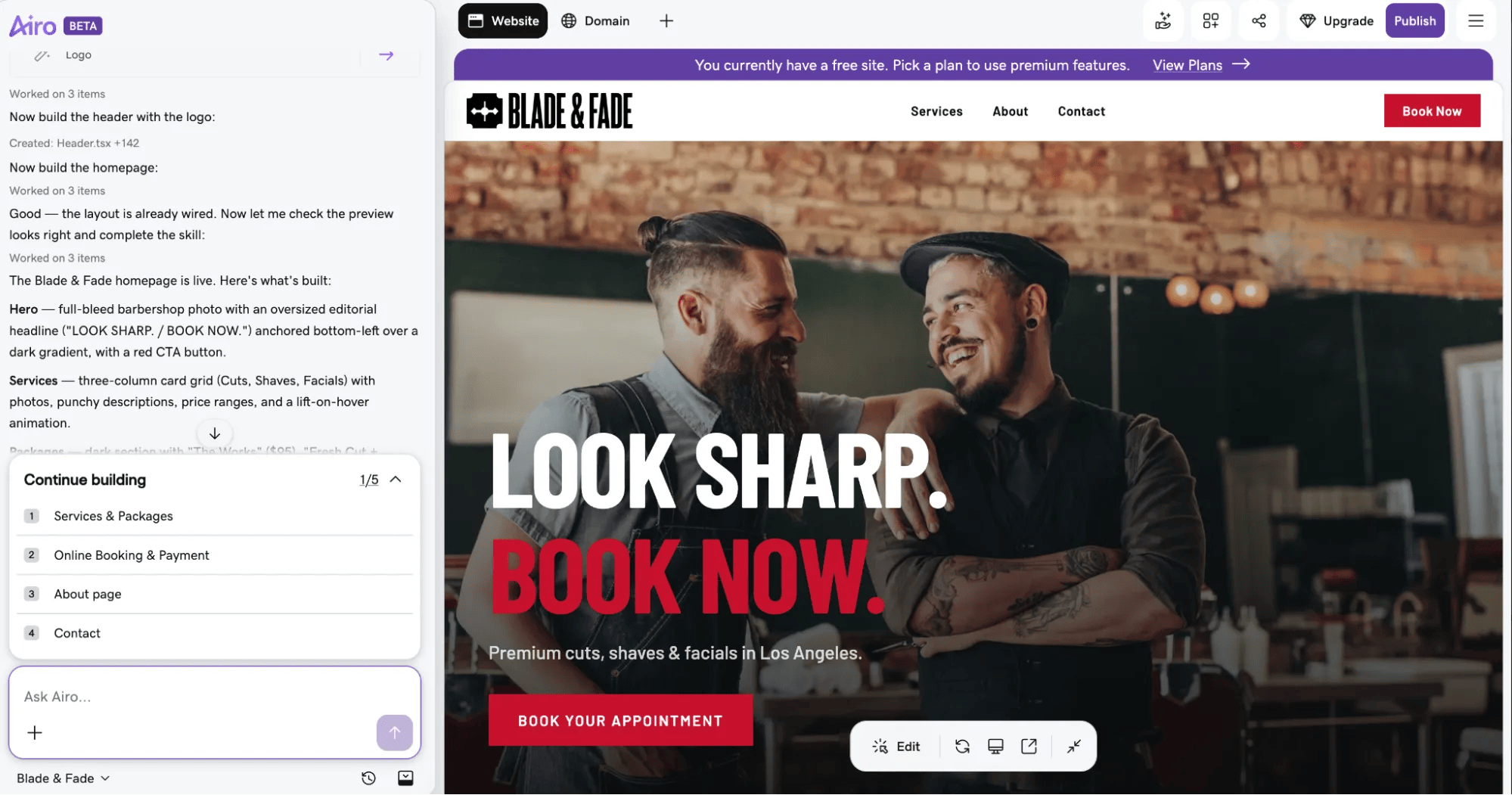
Airo creates a draft website for you to review. From there, you can continue the conversation to request changes. For example, you might ask Airo to:
For quick updates, like a price change or new policy wording, you can also edit text directly in the editor.
Once you’re happy, review the content and layout as you go, and keep refining the site until it fits your business. Check that service names, prices, durations, and policies are accurate before publishing.
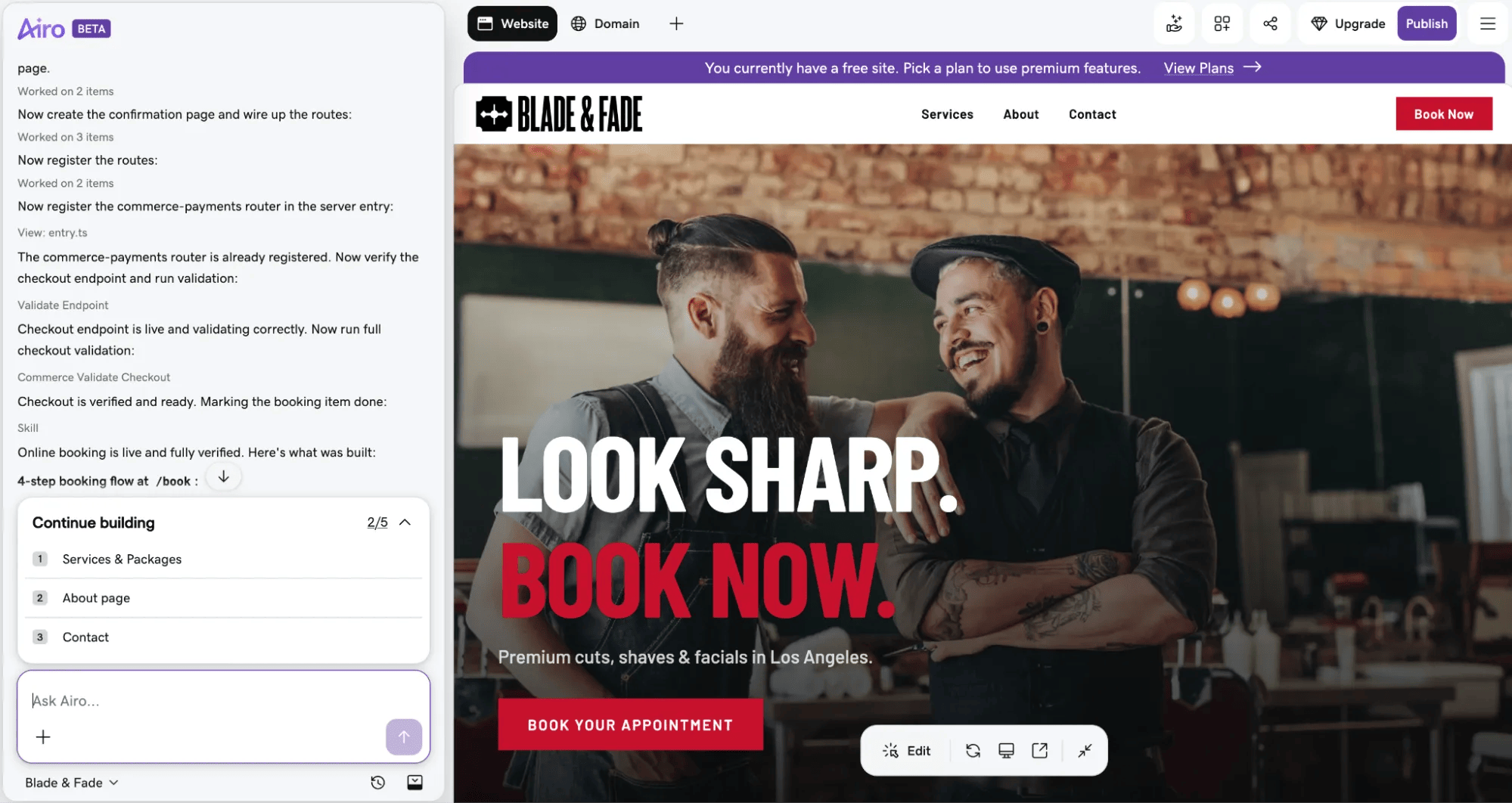
Configure the booking experience to match the way your business works. Depending on your needs, you can set up options such as:
You can manage booking and payment setup within Airo. If you already use a scheduling or payment service you prefer, check the available options for connecting it to your site.

When you’re happy with the website created by your paid Airo plan, connect your domain and publish it. Airo guides you through connecting the domain and configuring the settings needed to make your site available online. If you don’t already own a domain, eligible Airo AI Builder paid plans include a free custom domain.
Airo can help with its built-in SEO and AEO capabilities, such as page titles and meta descriptions, and build a mobile-responsive site. Before you launch, review the site on a phone and computer, test the booking process, and make sure your contact details, hours, service information, and policies are correct. Then you can start sharing the site with clients and accepting appointments.
GoDaddy Airo AI Builder
With a few prompts, Airo AI Builder generates your website, web app, pages, databases and logic in minutes — no coding required. Start for free with 50 AI credits a month. No credit card required.
Build for Free
A good booking website helps clients find the information they need and take the next step without waiting for a reply. Plan your pages and services, gather real photos, build and refine your site with Airo AI Builder, then set up bookings and payments before you publish.
With your domain, website, and booking experience in one place, you can spend less time coordinating tools and more time serving clients. Start building with Airo AI Builder, or explore its beauty industry solution if you run a salon, spa, or other beauty business.
A booking website lets clients learn about your services and schedule an appointment online. It typically includes service information, availability, a booking flow, and ways to contact the business.
How do I let clients book appointments on my website?
Add an online booking feature that lets visitors select a service, date, and available time, then confirm their appointment. Make the booking button easy to find, explain your policies, and send an automatic confirmation with appointment details.
Do I need a separate scheduling tool?
Not necessarily. Airo AI Builder can set up online bookings as part of the website build, so you may not need a separate scheduling tool. If you already use another service, check whether it can be connected to your site and suits your booking needs.
How much does it cost to make a booking website?
The cost depends on the website builder and plan you choose, and whether you need to pay separately for a domain, hosting, booking features, or payment processing. Compare what each plan includes and check for any transaction fees or usage-based costs before choosing.
Which website builder has the best built-in booking system?
The best option depends on your business and how you want to manage appointments. Look for the features you need — such as service selection, availability, payments, confirmations, and reminders — and consider whether you want booking and website tools together. Airo AI Builder is designed to help service businesses create a website and set up bookings through one guided build.
*One free available domain with new purchase of an annual Airo AI Builder plan. Plus annual ICANN fee per domain. Domain name must be added to cart before purchase, and selected term must be equal to or less than term of selected plan to qualify for free domain. Additional years billed at current rates. Offer valid for 1st year only; renews at current prices. Invalid with other offers.
The post How to build a booking website in 5 steps with AI appeared first on GoDaddy Blog.
Continue reading...
This guide covers what to plan before you start, what a useful booking website should include, and how to build and launch one with Airo AI Builder. You can create a site, add booking and payment options, and connect your domain — all without starting from code.
GoDaddy Airo AI Builder
Describe your idea. We’ll build your live website in minutes.
With a few prompts, Airo AI Builder generates your website, web app, pages, databases and logic in minutes — no coding required. Start for free with 50 AI credits a month. No credit card required.
Build for Free
Who needs a booking website?
Any business where clients schedule time with you can benefit from a booking website. It gives people one convenient place to learn about your services and request or book an appointment.
Common examples include:
- Hair and nail salons
- Barber shops
- Spas and massage therapists
- Personal trainers and fitness coaches
- Photographers
- Life coaches and consultants
- Therapists and counselors
- Tutors and music teachers
- Yoga and Pilates instructors
- Tattoo artists
- Med spas and aestheticians
- Pet groomers
The common thread is simple: if clients need to book a time slot with you, a booking website can help. Some industries have particular needs, so it can also help to look at a solution tailored to your type of business. For example, salons, spas, and other beauty businesses can explore Airo’s beauty solution.
What you need before building a website
A little preparation can make the building process faster and help you get a more useful first draft. The more clearly you can describe your business, services, and goals, the better Airo can understand what you want your website to do.
Make a plan
A few minutes of planning can save time later. Before you start building, think through your business description, the pages you need, and the photos you want to use.
Write a description of your business and the services you offer
Your business description is the starting point for an AI-built site. Be specific about what you do and what you want clients to do on your website. Include:
- The type of service you provide
- Who your typical clients are
- Your services and how they’re structured, such as by time, package, or session type
- What makes your business different
- The kind of experience or atmosphere you want clients to expect
For example, “I offer services and want bookings” doesn’t give a builder much to work with. A more useful description might be:
“I’m a certified personal trainer in Miami. I offer one-on-one training sessions, small group sessions, and online coaching packages. I specialize in strength training for beginners, and I want clients to be able to book and pay directly on my site.”
You don’t need to have perfect marketing copy. Clear, specific details give Airo more to work with and make it easier to refine the result.
Decide what pages you need
Most booking websites share a few core pages, but the right setup depends on your services and how clients make decisions. Consider starting with:
- Homepage: Introduce your business and make the next step clear.
- Services: List what you offer, with pricing and duration.
- Booking: Let clients choose a service and appointment time.
- About: Share your story, experience, and credentials.
- Reviews or testimonials: Show what past clients say about working with you.
- Contact: Provide a way to get in touch with questions.
- FAQ: Answer common questions before clients book.
- Policies: Explain cancellations, rescheduling, and other booking rules.
You don’t need every page on day one. Start with the essentials and add pages as your business grows. Your industry may also affect which pages are most useful.
Gather photos of your work, space, or team
Clients want to picture what they’re booking before they commit. Gather real photos that help them understand your service, such as:
- Your work: Finished projects, portfolio pieces or before-and-after photos, where appropriate.
- Your space: Your studio, office, salon, gym, or other place where the service happens.
- You or your team: Headshots or candid photos that show who clients will be spending time with.
Use real photos rather than AI-generated images or generic stock photos. For a service business, clients are choosing to spend time with a real person or team, so authentic images can help build trust. Phone photos are fine if they’re clear and well-lit.
Buy a domain name
A custom domain can help your business look professional and make it easier for clients to find and remember your website. If you’re choosing one, keep these tips in mind:
- Use your business name or your own name, which is common for solo service providers.
- Keep it short and easy to spell.
- Consider .com, or choose an extension that fits your business, such as .studio, .coach, .salon, and .photography.
- Avoid hyphens and numbers if you can.
Eligible Airo AI Builder paid plans include a free custom domain*, so you may not need to purchase one separately. If you already own a domain, you can connect it during the build.
Want to see if the domain you want is available? Give it a try here:
SEARCH
Prompting tips to make your booking website stand out
When you use Airo AI Builder, the details in your prompt help shape the website it creates. Instead of describing your business in broad terms, tell Airo what you offer, who you serve, and what visitors should do.
- Name your specific service. “Certified prenatal massage therapist” gives more context than “massage business.”
- List services, durations, and prices. For example: “60-minute deep tissue massage — $120; 90-minute hot stone massage — $160.”
- Describe the experience you want to convey. Try words like calming and luxurious, energetic and motivating, or professional and clean.
- Say what action you want visitors to take. Should they book an appointment, buy a package, or request a consultation?
- Mention your branding. If you have a logo or brand colors, include them so Airo can use them as a guide.
- Include important policies. Mention cancellation windows, deposits, or late-arrival rules you want visitors to see.
For example, you could ask Airo:
“Build a website for my independent hair salon. Include cuts, color, and styling services with space for pricing and appointment length. Use a warm, modern style and make it easy for visitors to book online.”
“Create a website for my photography studio. I photograph families and small businesses, offer several session packages, and want visitors to inquire about availability.”
“Build a booking website for my yoga studio. Show class types and schedules, explain what new students should bring, and make it easy to reserve a spot.”
Booking website checklist
Use this checklist while you build and as a final review before your website goes live. The details may vary by business, but these basics help clients understand your services and book with confidence.
Service list with pricing and duration
Clients want to know what’s available, how much it costs, and how long it takes before they book. Give each service a clear name and description, along with a price—or a starting price—and its duration. This helps clients choose the right option without needing to contact you for basic details.
Online booking
Online booking is the core feature of a booking website. Clients should be able to choose a service, select a date and time, and confirm the appointment without a long back-and-forth. Keep the process simple and mobile-friendly, and make a prominent Book now button easy to find throughout the site.
Automated confirmations and reminders
Send clients a confirmation as soon as they book, with the appointment details they’ll need. Automated reminders before an appointment can help reduce missed bookings and make it easier for clients to remember when they’re due. Make sure your confirmation clearly explains how to get in touch if something changes.
About page with your story and credentials
Service businesses are personal: clients are booking time with a person, not buying a product off a shelf. Use your About page to introduce yourself, describe your background and credentials, and explain what it’s like to work with you. That context can help someone feel more comfortable booking for the first time.
Photos of your work or space
Photos let clients picture the experience before they book. Show your space, examples of your work where relevant, and the person or team they’ll meet. Use real, current photos so visitors get an honest impression of your business.
Client reviews and testimonials
Booking an appointment is a trust decision, and feedback from past clients can help people make it. Share reviews from sources such as Google, or use short quotes from messages and social media with permission. Place testimonials near your services or booking button, where they can answer questions at the moment a client is deciding.
Location, hours and availability
Tell clients where the service takes place: at your business, at their location, or online. Include your hours and explain how far in advance they can book. Keep this information up to date so clients don’t choose a time based on outdated availability.
Cancellation and booking policy
A clear policy sets expectations and can help protect your time and revenue. Explain how much notice clients need to give to cancel or reschedule, whether deposits are forfeited, and what happens if someone arrives late. Make the policy easy to find before clients confirm a booking.
Contact information
Some clients will want to ask a question before they book. Include a contact form and, where appropriate, your email address and phone number. Make contact information easy to find from every page, even if most visitors book online.
Social media links
Links to your social profiles give visitors another way to see your business and recent work. For many service businesses, Instagram can be an important showcase. Link only to profiles you keep active, so visitors see a current and consistent picture of your brand.
Build a booking website: step by step with Airo AI Builder
Once you have a plan, photos, and domain ready, you can start building. Airo AI Builder helps businesses—including service providers such as salons, spas, and other beauty businesses—create a website through conversation. You can describe what you need, refine the site, and set up booking and payments in the same build, without coding or a separate scheduling tool.
If you’re in the beauty industry, you can also build a booking website for your business with Airo AI Builder.
Step 1: Describe your business to Airo AI Builder
Start by telling Airo what your business does, who you serve, what services you offer, and what you want visitors to do on your site. This is where the description you prepared earlier comes in handy.
You can also attach helpful files, such as a logo or service menu, or point Airo to an existing website or social media page to use as a reference.
For example:
“I run a local barber shop offering haircut appointments and packages. Create a professional website that explains my services, helps clients choose an option, and lets them book and pay online.”
Add any details that matter to your business, such as your location, preferred style or the types of appointments you offer.
Step 2: Answer a few questions
After your initial description, Airo may ask follow-up questions to refine the website. These might cover which pages to include, whether you want online booking and payments, or what visual style you prefer. It’s a short back-and-forth to clarify the build—not a lengthy questionnaire.
Answer as specifically as you can. If you’re not sure about a detail, you can start with the essentials and refine the site later.
Step 3: Edit your site with follow-up prompts
Airo creates a draft website for you to review. From there, you can continue the conversation to request changes. For example, you might ask Airo to:
- “Add a booking button to the top of every page.”
- “List my services with pricing and session length.”
- “Change the color scheme to match my logo—sage green and white.”
- “Add my cancellation policy to the booking page.”
- “Create a separate page for group classes.”
For quick updates, like a price change or new policy wording, you can also edit text directly in the editor.
Once you’re happy, review the content and layout as you go, and keep refining the site until it fits your business. Check that service names, prices, durations, and policies are accurate before publishing.
Step 4: Set up online bookings and payments
Configure the booking experience to match the way your business works. Depending on your needs, you can set up options such as:
- Appointments with a service, date and time selection
- Payment processing for services via GoDaddy Payments, Stripe, and Square
- Packages or bundles, such as a five-session pack
You can manage booking and payment setup within Airo. If you already use a scheduling or payment service you prefer, check the available options for connecting it to your site.
Step 5: Connect your domain and go live
When you’re happy with the website created by your paid Airo plan, connect your domain and publish it. Airo guides you through connecting the domain and configuring the settings needed to make your site available online. If you don’t already own a domain, eligible Airo AI Builder paid plans include a free custom domain.
Airo can help with its built-in SEO and AEO capabilities, such as page titles and meta descriptions, and build a mobile-responsive site. Before you launch, review the site on a phone and computer, test the booking process, and make sure your contact details, hours, service information, and policies are correct. Then you can start sharing the site with clients and accepting appointments.
GoDaddy Airo AI Builder
Describe your idea. We’ll build your live website in minutes.
With a few prompts, Airo AI Builder generates your website, web app, pages, databases and logic in minutes — no coding required. Start for free with 50 AI credits a month. No credit card required.
Build for Free
Launch your booking website today
A good booking website helps clients find the information they need and take the next step without waiting for a reply. Plan your pages and services, gather real photos, build and refine your site with Airo AI Builder, then set up bookings and payments before you publish.
With your domain, website, and booking experience in one place, you can spend less time coordinating tools and more time serving clients. Start building with Airo AI Builder, or explore its beauty industry solution if you run a salon, spa, or other beauty business.
Booking website FAQ
What is a booking website?A booking website lets clients learn about your services and schedule an appointment online. It typically includes service information, availability, a booking flow, and ways to contact the business.
How do I let clients book appointments on my website?
Add an online booking feature that lets visitors select a service, date, and available time, then confirm their appointment. Make the booking button easy to find, explain your policies, and send an automatic confirmation with appointment details.
Do I need a separate scheduling tool?
Not necessarily. Airo AI Builder can set up online bookings as part of the website build, so you may not need a separate scheduling tool. If you already use another service, check whether it can be connected to your site and suits your booking needs.
How much does it cost to make a booking website?
The cost depends on the website builder and plan you choose, and whether you need to pay separately for a domain, hosting, booking features, or payment processing. Compare what each plan includes and check for any transaction fees or usage-based costs before choosing.
Which website builder has the best built-in booking system?
The best option depends on your business and how you want to manage appointments. Look for the features you need — such as service selection, availability, payments, confirmations, and reminders — and consider whether you want booking and website tools together. Airo AI Builder is designed to help service businesses create a website and set up bookings through one guided build.
*One free available domain with new purchase of an annual Airo AI Builder plan. Plus annual ICANN fee per domain. Domain name must be added to cart before purchase, and selected term must be equal to or less than term of selected plan to qualify for free domain. Additional years billed at current rates. Offer valid for 1st year only; renews at current prices. Invalid with other offers.
The post How to build a booking website in 5 steps with AI appeared first on GoDaddy Blog.
Continue reading...
