


godaddy
New Member
ICANN Accredited Registrar
Domain Marketplace
Domain Broker
Hosting Provider
ICA Member
ISO 27001
- Joined
- Jan 26, 2009
- Messages
- 159
- Reaction score
- 13
- Unlike product-based businesses, coaching websites need to build a personal connection first. Visitors want to understand your perspective and feel a sense of trust before they ever book a call.
- Framing your services around client outcomes (e.g., “career clarity in six weeks”) rather than session counts makes your offers feel more purposeful and easier for visitors to act on.
- Making a discovery call the primary call to action is one of the most effective ways to convert curious visitors into prospective clients.
- When prompting GoDaddy Airo AI Builder, naming your specific niche and audience (e.g., “executive coach for first-time VPs at tech companies”) gives the builder far more direction than a broad label like “business coach.”
- GoDaddy Airo AI Builder can connect to tools coaches already rely on — including Calendly, Zoom, Stripe, and Mailchimp — so your site can handle scheduling, payments, and lead nurturing from day one.
Your coaching website is where a curious visitor can become a potential client. It gives you room to explain your perspective, show who you help, and invite people to book a discovery call. Social media can start the conversation, but your website gives you control over your message, your offers, and the path someone takes to work with you. This guide shows you how to use GoDaddy Airo AI Builder to create a coaching website that reflects your work and helps new clients connect with you.
GoDaddy Airo AI Builder
Describe your idea. We’ll build your live website in minutes.
With a few prompts, Airo AI Builder generates your website, web app, pages, databases and logic in minutes — no coding required. Start for free with 50 AI credits a month. No credit card required.
Build for Free
What to prepare before building your website
Before you open the builder, take stock of the elements and characteristics that make your coaching practice yours. A clear point of view, a sense of who you serve, and a few decisions about how clients can work with you will give Airo a much better foundation for building the first draft of your site.
Get organized
Planning your website ahead of time helps you avoid vague copy, scattered pages, and extra revisions later. Have these three things ready before you start building:
Write a description of your coaching practice (niche, who you help, your approach, what makes you different)
Airo uses the details you provide to shape your site’s copy, structure, and overall tone. The description you give doesn’t have to be perfect, but it should paint a clear picture of your practice.
Include details such as:
- Your coaching niche, such as life, career, executive, health, relationship, or business coaching
- The people you work with, such as mid-career professionals, new managers, entrepreneurs, parents, or athletes
- How you deliver sessions, including one-on-one coaching, group programs, courses, retreats, or a hybrid model
- Where you work with clients, including virtually, in person, or both
- Your methodology, framework, or signature process
- Relevant credentials, certifications, and training
- What distinguishes your work, such as your experience, point of view, personal story, or client outcomes
- The tone you want your site to have, such as warm and approachable, polished and corporate, or bold and energetic
Use these description examples as a guide:
Vague Description: “I’m a life coach.”
Detailed Description: “I’m a career transition coach for mid-career professionals leaving corporate jobs. I work one-on-one over Zoom in six- to 12-week engagements. I’m ICF-certified with eight years of experience. My clients often come to me feeling stuck and leave with a clear plan for pursuing a new role. I want my site to feel warm, professional, and straightforward, not fluffy.”
Map out your pages
Most coaching websites include pages like:
- Homepage
- Services and packages
- About
- Booking or discovery call
- What to expect
- Testimonials
- Blog or resources
- FAQ
- Contact
Start with the pages that help visitors understand your work and get in touch, like the homepage, about page, services page, booking page, and contact page, then add more as your coaching brand grows.
Gather photos of yourself
Coaching is personal. Before someone books a call, they often want to see the person they may be working with.
Choose a warm, approachable headshot, plus one or two photos that show you in your element. That could mean working at your desk, speaking at an event, or meeting with a client. Professional-quality photos matter, but you don’t need a studio shoot; a well-lit image with a clean background can work just as well.
Match your photos to the experience you want clients to expect. A relaxed, personal coaching practice may call for natural, candid images, while executive coaching may lean toward a more polished look.
Choose a domain name
Your domain is the web address clients will use to find you, so it should be easy to remember and easy to share. Keep these guidelines in mind as you search for a domain name:
- Use your name or business name when possible
- Keep it short and easy to type
- Choose a .com for familiarity, or a .coach domain for a direct, relevant alternative
- Avoid hyphens, numbers, and hard-to-spell words
- Keep it close to your social media handles for a more consistent presence
Airo AI Builder paid plans include a free custom domain, so you may not need to buy one separately. If you already own a domain, you can connect it during the publishing process.
Find your perfect domain name today
SEARCHPrompting tips to make your coaching website stand out
Airo AI Builder builds your site around the details you share. A prompt like “I’m a coach” leaves a lot open to interpretation. A prompt that explains your audience, services, and point of view gives Airo a clearer brief and gives you a stronger place to start.
Here’s how to talk to Airo about your coaching business.
- Start with your niche and audience. Name the kind of coach you are and the people you serve. “Executive coach for first-time VPs at tech companies” gives Airo a much clearer direction than “business coach.”
- Describe the tone you want visitors to experience. Your site should sound like the version of you clients meet in a session. Tell Airo if your voice is warm and conversational, polished and professional, or bold and energetic.
- Spell out your preferred booking flow. Be direct about the action you want visitors to take. For example, tell Airo, “Make discovery call booking the main call to action on every page.”
- Talk about the outcome, not only the format. A six-session package tells people how your service is delivered. The change clients hope to make tells them why it matters. Ask Airo to focus your services page on the progress clients can expect.
- Name what falls outside your practice. Clear boundaries help attract better-fit leads. If you do not offer couples coaching, therapy, or in-person sessions, include that information in your prompt.
- Share your methodology. Mention a named framework, a signature process, or the principles behind your work. Airo can carry those details through your homepage, services copy, and supporting pages to create a more cohesive site.
Here are a few examples of prompts you can adapt to fit the way you work:
Career coach
Create a warm, practical website for my one-on-one career coaching practice. I help mid-career marketing professionals move out of roles that no longer fit and into work that feels more aligned. My clients meet with me virtually over Zoom in eight-week engagements. Make discovery call booking the main call to action throughout the site. I want the services page to focus on clarity, confidence in career decisions, and a realistic action plan. I do not provide résumé writing or recruiting services.
Wellness coach
Build a friendly, encouraging website for my group wellness coaching program for women over 40. I help clients create sustainable routines around movement, food, sleep, and stress management. My signature program includes weekly group calls, a private community, and simple habit-tracking tools. The site should feel upbeat, supportive, and free of perfectionism. Lead visitors toward joining the next program waitlist.
Executive coach
Create a polished, credible website for an executive coaching practice serving first-time VPs and directors at growing technology companies. I offer private coaching for leaders who need to strengthen communication, manage competing priorities, and lead larger teams. My approach combines leadership assessments with a practical coaching framework developed over 15 years in people operations. Include a clear inquiry form for HR leaders and a separate discovery call option for individual clients.
Coaching website checklist
Reference this checklist as you build your coaching website with Airo AI Builder. Not every item will fit every practice, so choose what supports your clients and your brand.
Homepage that clearly states who you help and how
Your homepage should quickly answer three things: who you help, what you help them accomplish, and where to go next. Put your niche front and center so the right visitors recognize themselves. Make booking a discovery call the primary call to action, and trade broad promises for a clear picture of the change you help create.
Services and packages with pricing
Describe your offers through the lens of the client’s goal. For example, “Six-week career clarity program” communicates more than “six one-hour sessions” because it gives the work a purpose. Pricing can be public or saved for a discovery call, but visitors should understand what is included and what the engagement is designed to help them achieve.
About page with your story, credentials, and approach
People hire coaches because of the connection they feel with the person behind the practice. Use this page to share your path into coaching, relevant training, coaching philosophy, and the approach you bring to sessions. Include a professional photo that fits the tone of your brand.
Online booking or discovery call scheduling
A free 15- to 30-minute discovery call is often the first step in a coaching relationship. Give that option prominent placement throughout your site instead of tucking it away on the contact page. Add the booking link to your homepage, services page, and navigation so visitors can act when they are ready.
What to expect (your coaching process)
Coaching can feel unfamiliar to someone considering it for the first time. A simple overview of your process can make the next step easier to understand and help visitors know what they are signing up for. This page can be as simple as a brief introduction and a step-by-step list, such as:
- Book a discovery call
- Discuss goals and fit
- Start regular coaching sessions
- Check in on progress
- Wrap up with a plan for what comes next
Client testimonials and success stories
The best testimonials show what changed for a client. A statement such as “I earned a promotion within three months” carries more weight than general praise alone. Ask clients for feedback once they begin seeing results. Only include their name and relevant context with permission.
Blog or resources
A blog is where you can answer questions your ideal clients are already searching for. Useful articles can help people find your site, understand your expertise, and get a taste of your coaching style before they book. They also give you material to share in email newsletters and on social media.
Email list or newsletter signup
Many visitors will need time before they decide to hire a coach. Offer something useful in exchange for an email address, such as a guide, worksheet, quiz, or mini-course related to your niche. This gives you a way to stay in touch and offer a preview of your services or expertise before a visitor is ready to book.
FAQ (common questions about coaching with you)
An FAQ can handle the practical questions that often delay a booking. Cover details like session length, recommended engagement length, cancellation policies, virtual availability, investment, and the difference between coaching and therapy. Clear answers save time for you and your future clients.
Location, hours, and session format (in-person, virtual, or both)
Let clients know exactly how they can work with you. State clearly if sessions are virtual, in person, or a mix of both. If sessions will be virtual, name the platform you use and the time zone you work in. If coaching is in person or you have a physical office clients can visit, include your business address, map, and hours.
Contact page
Keep your contact page focused. Include a simple form, an email address, and a visible link to book a discovery call. Explain which option works best for general questions and which one is for prospective clients ready to talk.
Social media and directory links
Link to profiles that give visitors another way to get to know your work. Stick to the platforms you actively use, and include reputable coaching directories if you have a listing. This could include:
- ICF directory
- Noomii
Create a coaching website: step by step with Airo AI Builder
Now it’s time to turn all of these components into a client-ready online presence. Create a coaching website with Airo AI Builder by describing your practice in plain language, then refining the site through a conversation—no coding skills required.
GoDaddy Airo AI Builder
Describe your idea. We’ll build your live website in minutes.
With a few prompts, Airo AI Builder generates your website, web app, pages, databases and logic in minutes — no coding required. Start for free with 50 AI credits a month. No credit card required.
Build for Free
Step 1: Describe your coaching practice to Airo AI Builder
First, you’ll need to describe your business to start the build process. Using the instructions from earlier in the guide, make sure that you’ve included your coaching niche, who you help, whether you’re virtual or in-person, and the tone you want for your site.
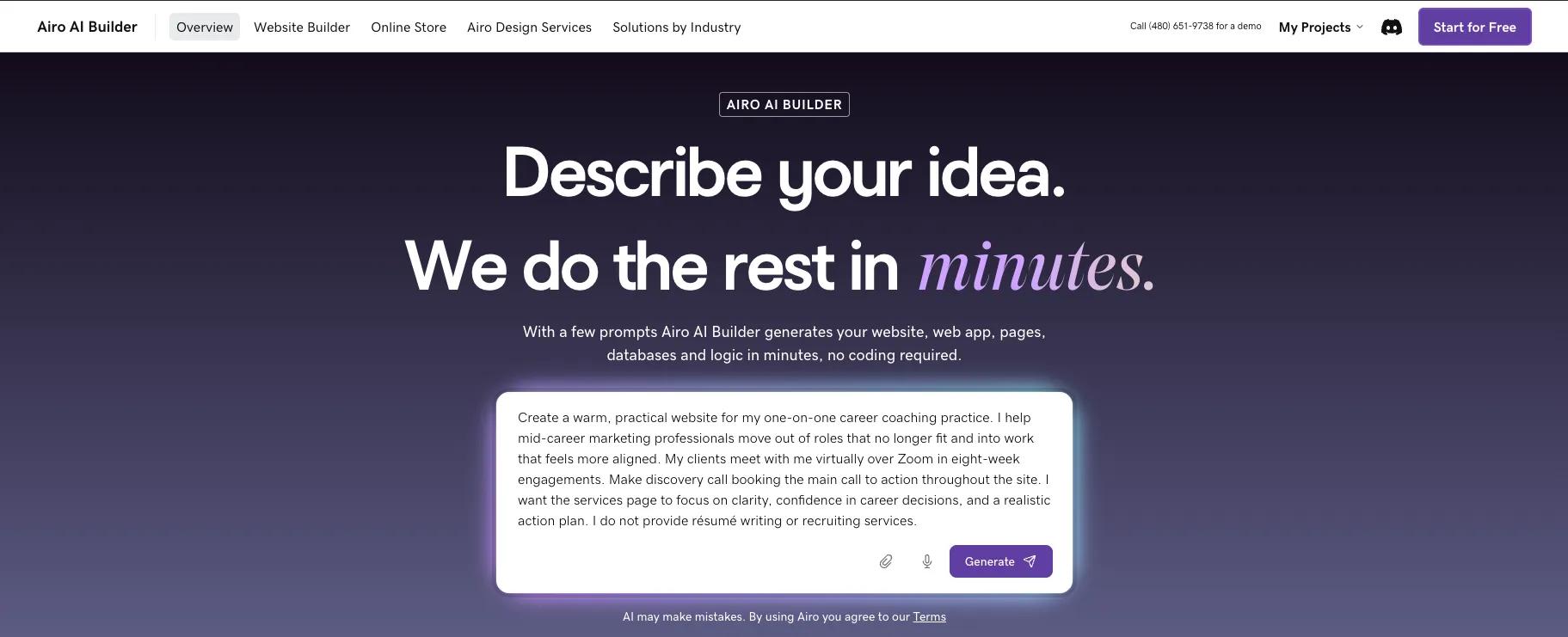
Create a warm, practical website for my one-on-one career coaching practice. I help mid-career marketing professionals move out of roles that no longer fit and into work that feels more aligned. My clients meet with me virtually over Zoom in eight-week engagements. Make discovery call booking the main call to action throughout the site. I want the services page to focus on clarity, confidence in career decisions, and a realistic action plan. I do not provide résumé writing or recruiting services.
If you’ve already got a logo for your business, you can attach it in your prompt. Also, if you already have a website that you’d like Airo to reference, feel free to include the URL for your current site as well.
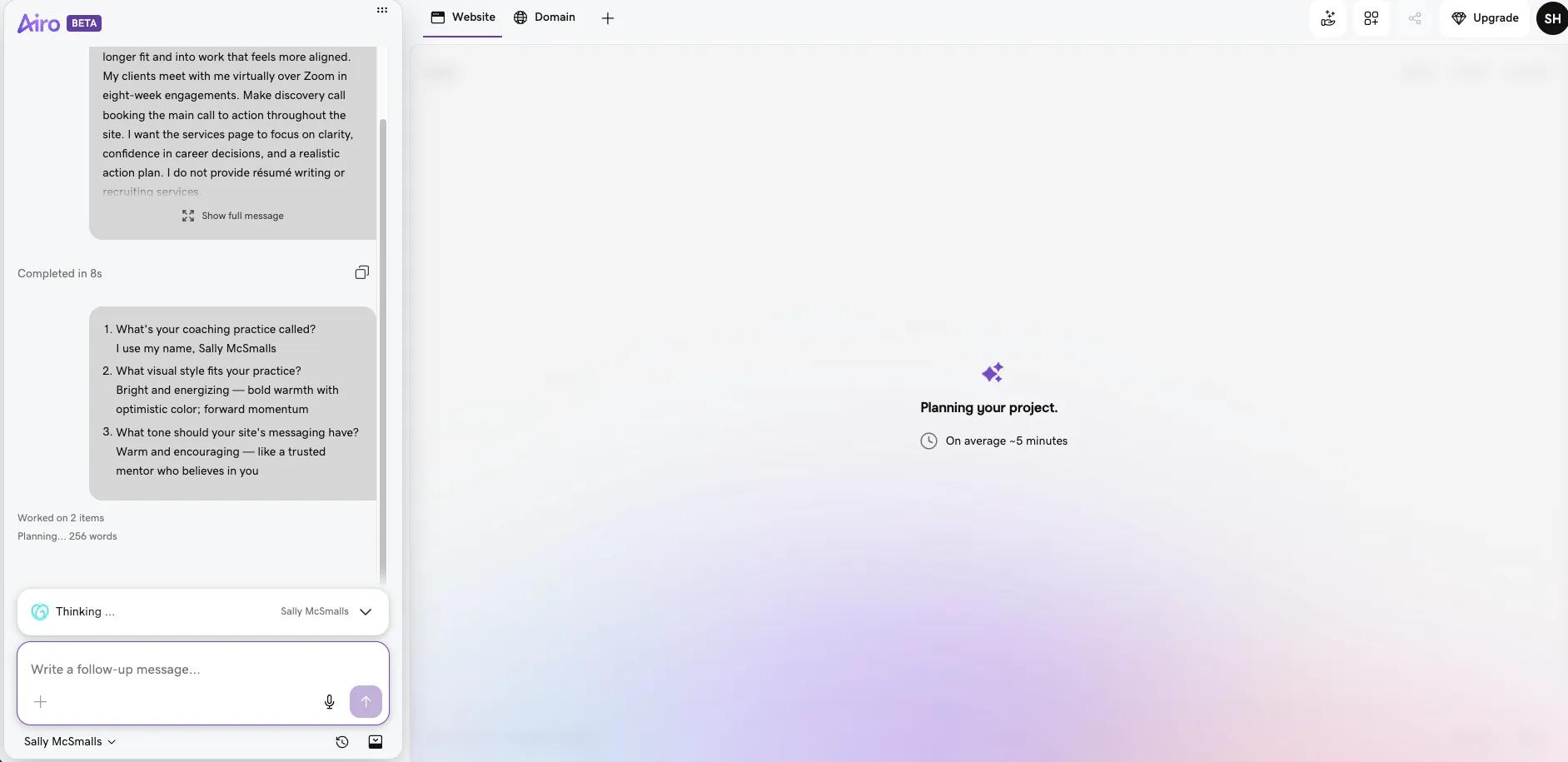
Step 2: Answer a few follow-up questions
Once the site building process has started, Airo AI Builder will ask a few clarifying questions at the start. These quick questions are meant to guide the website build in the direction that you envision, including what pages you need, whether you want a blog, or color preferences.
Step 3: Refine your site with follow-up prompts
Once the initial build has been completed, you’ll be presented with a draft version of your website. From here, you’ll want to build out your website by continuing the conversation with Airo AI Builder. Some examples of how that might look include:
- “Rewrite my services page to focus on client outcomes, not session counts”
- “Add a ‘what to expect’ section that walks clients through my coaching process step by step”
- “Add a discovery call booking widget to the homepage and services page”
- “Make the tone warmer and more conversational — less corporate”
- “Add an FAQ section that covers session length, pricing, cancellation policy, and whether coaching is the same as therapy”
- “Add a lead magnet signup for my free career clarity worksheet”
Keep customizing your website until you’re happy with the results.
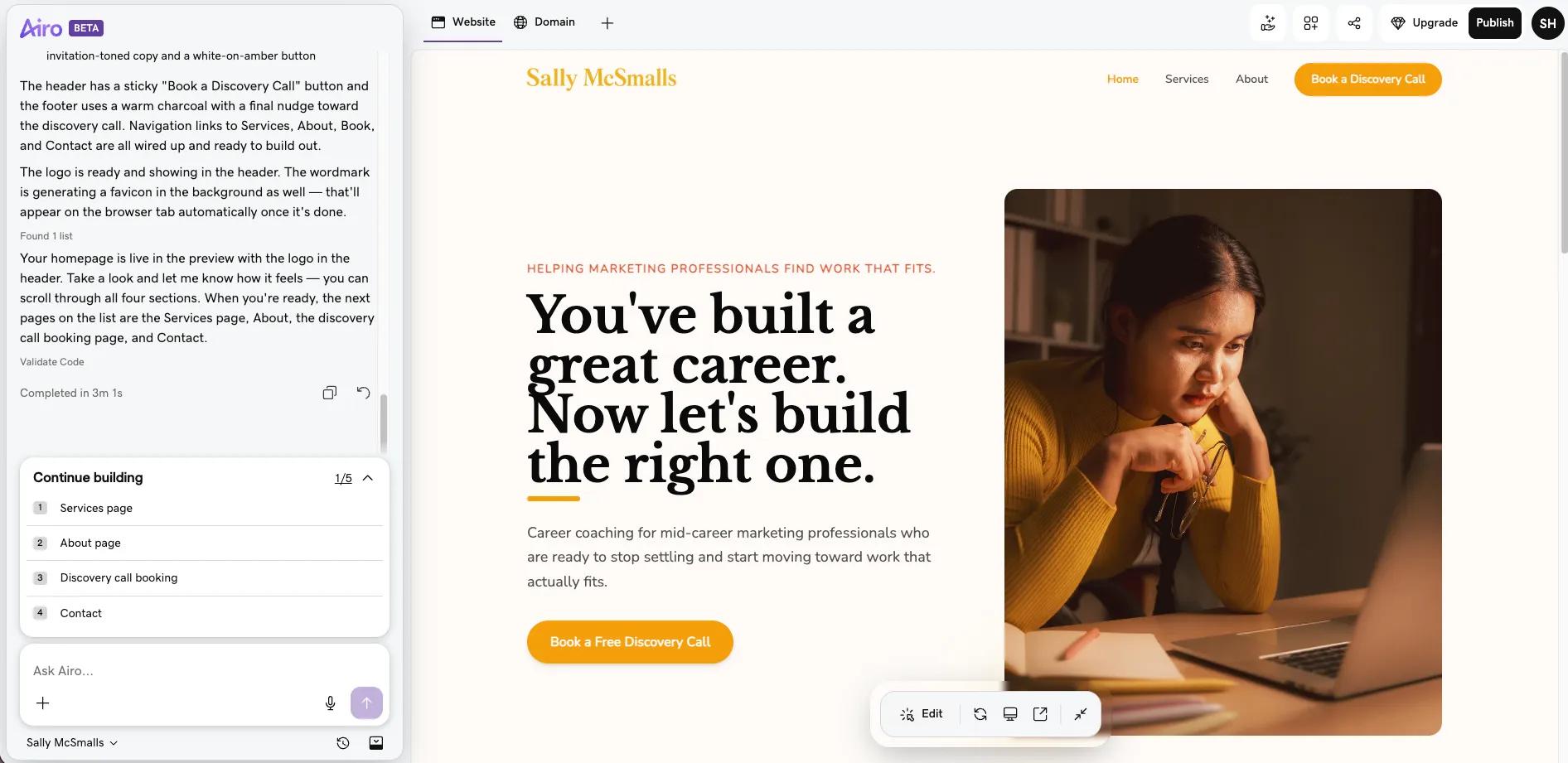
Note: Revising copy and images by clicking into the editor mode does not consume any of your monthly AI credits, while design changes, new pages, and AI-generated copy do.
Step 4: Set up booking, payments, and connect your tools
When you’re satisfied with the look and tone of your website, you can move on to adding a booking engine to onboard new clients. This can include:
- Adding a discovery call booking link or scheduling widget.
- Setting up payment processing for session packages and programs.
- Adding an email signup form with your lead magnet.
- Adding a client intake or assessment form for new clients to fill out before the first session.
These features and functions can be added by Airo AI Builder conversationally, so feel free to explain exactly what your business needs, and Airo will get started for you. You can also connect your website to third-party apps that you might already be using, such as:
- Calendly or Google Calendar for scheduling
- Zoom or Google Meet for virtual sessions
- Stripe or Square for payments
- Mailchimp or Klaviyo for email
- HubSpot or Zoho CRM for client tracking
- Typeform or Google Forms for intake forms
- Google Business Profile for local visibility
Once you’ve added what your coaching business requires, it’s a good idea to preview the booking and payment flow (on desktop and mobile) to make sure everything works smoothly.
Step 5: Link your domain and go live
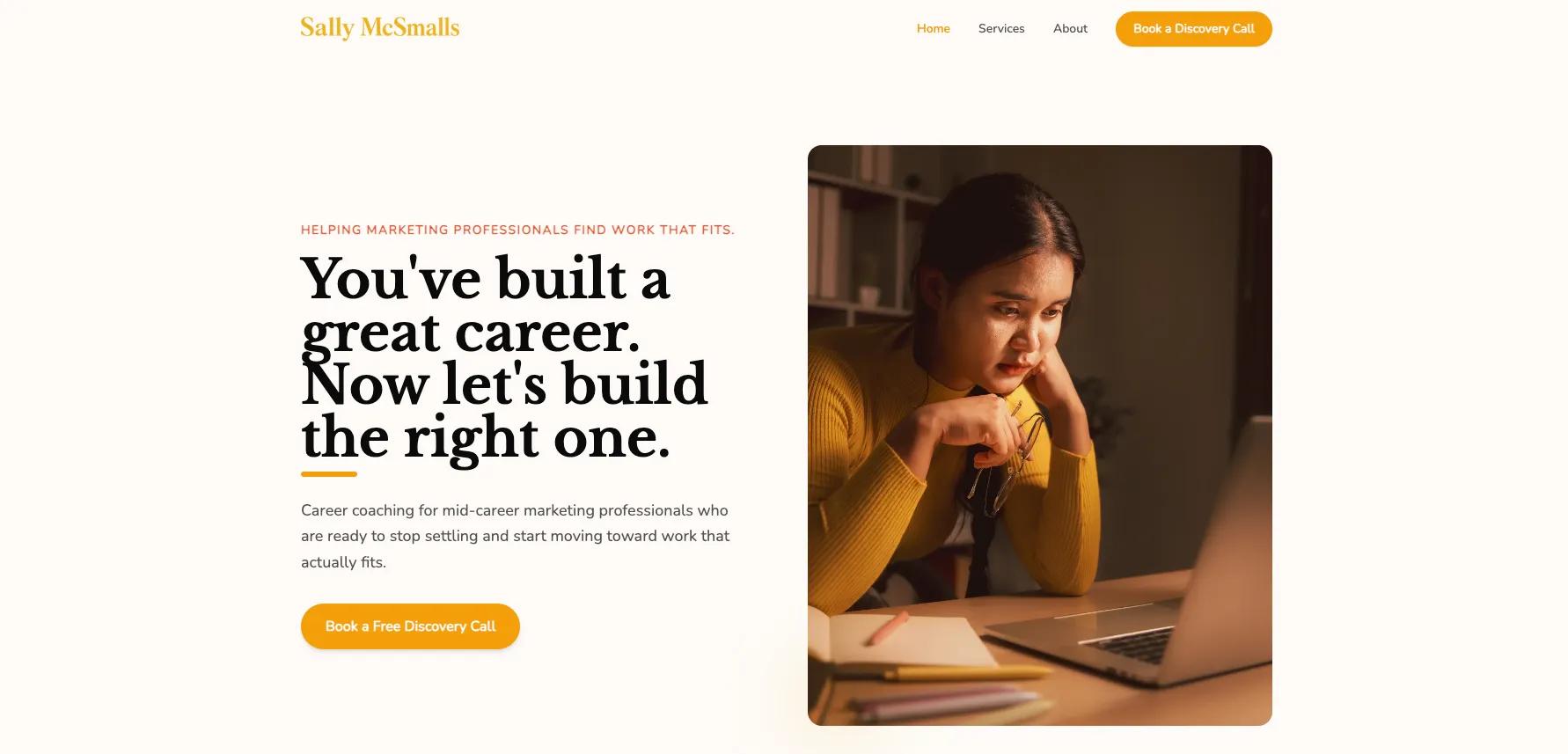
After you’ve tested your website and you’re happy with the look, functionality, and overall tone, it’s time to bring your website live. Airo AI Builder builds your website with SEO and mobile optimization from the start, allowing you to get your site online even quicker.
If you haven’t upgraded to a paid plan yet, you will need to do so before you can publish your site. Click on the Upgrade button at the top right to choose and pay for your desired plan. Your paid plan will include a free one-year domain registration, so you can also grab your desired domain name during this step.
Then, once you’re ready, click the Publish button at the top right, add your domain name, then click Publish at the bottom of the publishing window.
Important note: If your domain is registered in the same GoDaddy account as Airo AI Builder, then your domain’s DNS settings will be configured automatically when publishing. If your domain is registered in a different GoDaddy account, or at a different domain registrar, then additional steps will be required before your site can be live online. See our help guide on how to connect a domain to Airo AI Builder for the steps needed for each domain scenario.
Launch your coaching website today
A strong coaching website makes it easier for the right people to understand your work and take the next step. Start with the essentials, stay specific about the clients you serve, and add new pages or resources as your practice grows.
Ready to find your next client? Build a coaching website with Airo AI Builder today.
GoDaddy Airo AI Builder
Describe your idea. We’ll build your live website in minutes.
With a few prompts, Airo AI Builder generates your website, web app, pages, databases and logic in minutes — no coding required. Start for free with 50 AI credits a month. No credit card required.
Build for Free
Coaching website FAQ
What should a coaching website include?A coaching website should make it easy to understand who you help, how you work, and how to take the next step. Start with a clear homepage, services page, about page, booking option, testimonials, and contact details, then add resources or email sign-up tools as your practice grows.
Can clients book sessions directly from my website?
Yes. Airo AI Builder can add online booking so prospective clients can choose an available time without emailing back and forth. Place a discovery call or session booking link on your homepage, services page, and navigation menu to make it easy to find.
How much does a coaching website cost?
The cost depends on the plan, your domain, and any extra tools you choose to add. You can explore Airo AI Builder for free, then upgrade to a paid plan when you’re ready to publish a client-facing site with features such as a custom domain, booking, and payments. Airo paid plans start at $9.99 per month when billed annually.
Does Airo AI Builder also work for schools or institutions?
Yes. Airo AI Builder can create public-facing sites for schools, academies, tutoring businesses, and educational programs, including admissions pages, staff directories, event pages, and inquiry forms. Internal systems for grades, attendance, student records, and billing should remain in the specialized platforms your institution already uses.
The post How to create a coaching website with AI appeared first on GoDaddy Blog.
Continue reading...

