


godaddy
New Member
ICANN Accredited Registrar
Domain Marketplace
Domain Broker
Hosting Provider
ICA Member
ISO 27001
- Joined
- Jan 26, 2009
- Messages
- 143
- Reaction score
- 12
Your art deserves more than a folder of files or a social media feed that changes by the hour. Painters, illustrators, sculptors, photographers, and other artists can use a portfolio website to give their work a dedicated home where potential clients, collaborators, and fans can explore their style and get in touch.
The good news is that creating that home no longer requires design or coding experience. AI tools can help you organize your ideas, write compelling project descriptions, and build a polished site that feels true to your creative vision.
Let’s explore how to build an art portfolio website step by step with GoDaddy Airo AI Builder, starting with everything you need to do before logging in.
GoDaddy Airo AI Builder
With a few prompts, Airo AI Builder generates your website, web app, pages, databases and logic in minutes — no coding required. Start for free with 50 AI credits a month. No credit card required.
Build for Free
Before opening an AI website builder, take time to prepare the work and information your site will need. A little upfront planning makes the build faster and gives visitors a clearer picture of your work. An art portfolio website is only as strong as the work, details, and direction you put into it.
Tackle these four essentials before creating your site, then use them to guide the copy, design, and structure.
Your description is the foundation for your website. It helps an AI website builder understand the copy, tone, layout, and visual style that suit your work.
Include details such as:
Giving the AI website builder concrete information about yourself and the portfolio you want to build will lead to a more accurate, personalized website. Leaving things too vague will make the results more generic. For example:
Vague description: “I’m an artist, and I want a portfolio.”
Detailed description: “I’m a contemporary oil painter based in Portland. I create large-scale abstract landscapes inspired by the Pacific Northwest. I want my site to attract collectors and galleries, and I also sell limited-edition prints online.”
This can also be a great starting point for your artist statement later on.
Most art portfolio websites use a similar structure, but the right pages depend on your goals and the ways you share or sell your work. Common options include:
You don’t need every page on day one. A strong homepage, gallery, about page, and contact page are enough to launch a professional portfolio site.
Curating your portfolio is one of the most important preparation steps because your work is the centerpiece of the site. Focus on a concise collection that represents the kind of work you want to create and be known for. To do this:
Digital artists may already have polished files ready to upload, but artists working in physical media need high-quality photos that accurately represent their work online. The quality of those images directly affects how visitors experience your art, so make sure you:
A professional photography session can be a worthwhile investment if you cannot capture the work well yourself. Poor photos can undersell even exceptional art.
A domain name is your website’s unique address on the internet, like yourname.com. A custom domain gives your art a professional home online. It’s often one of the first things a gallery owner, collector, or art director sees, so choose a name that is easy to remember and clearly connected to your work.
You don’t have to be a domain expert to pick the right one for your portfolio. Just use these tips:
It’s a good idea to search for and register a domain name before building your site so you know it’s available. Airo AI Builder paid plans include a free custom domain*, and existing domains can be connected during the build.
Think of your prompt as a creative brief for your portfolio. Airo AI Builder uses the description you provide to create a website that reflects your work and goals. The more specific you are about your art, audience, and ideal site, the more tailored the result can be.
Need some more guidance? Check out these Airo AI Builder art portfolio prompt examples:
Fine art painter: “Create a refined portfolio website for a Chicago-based oil painter who creates large-scale contemporary landscapes. Use a minimal, gallery-inspired design with white space, large artwork images, and an exhibition history page. My goal is to attract galleries and collectors interested in original paintings.”
Commercial illustrator: “Build a bright, modern portfolio for a botanical watercolor illustrator. I create detailed plant and food illustrations for packaging, editorial work, and product brands. Use a clean grid gallery, warm natural colors, and a clear commissions page for art directors and commercial clients.”
Sculptor: “Create an elegant website for a ceramic sculptor who makes small-batch, nature-inspired pieces. Use an earthy, tactile design with full-width images, separate collections for each series, and a shop where collectors can purchase available work and limited editions.”
Use this quick-reference checklist to make sure your art portfolio website includes the elements that support your goals. Not every item applies to every artist, since someone seeking gallery representation may need something different than someone selling prints online. Use the items that fit your work as a guide during the build and as a final check before publishing.
Think of your homepage as the entrance to a gallery. Lead with a striking image or a curated selection of your best pieces above the fold, then include your name, what you create, and a clear next step. Keep the design clean, so the artwork remains the focus.
Your gallery is the lifeblood of the site, so it should be simple to browse on desktop and mobile. Organize work in a way that reflects your practice, such as by series, medium, theme, or most recent work. Give each piece a high-quality image, title, medium, dimensions, year, and availability status when relevant.
An artist statement explains the ideas, themes, and process behind your work. Galleries, curators, and serious collectors often look for it, so keep it concise, written in the first person, and free of unnecessary jargon. Aim for one to three paragraphs focused on the work itself, not your personal background.
Your about page introduces the person behind the art. Share your background, education, training, artistic journey, and location alongside a professional photo of yourself. Galleries and press may pull language from this page, so write a clear description that can stand on its own.
If you’re hoping for gallery representation or institutional shows, include an exhibition history, often called a CV. List solo and group exhibitions in reverse chronological order with the show name, venue, city, and year. Add relevant press coverage, publications, awards, residencies, and collections to show your professional track record.
Do you make personalized pieces for individual buyers? A dedicated commissions page makes it clear that you are available for custom work and helps potential clients understand the process. Include the types of commissions you accept, a starting price or range, a typical timeline, and an inquiry form that asks for important details, such as size, subject, budget, and deadline.
If you plan to sell your work, an online store gives you control over how you present available work and connect with buyers directly through your own site. Airo AI Builder can help you create an online store and connect payment options for selling originals, open-edition prints, limited-edition prints, digital downloads, and more.
Testimonials from collectors, clients, or gallery owners can build confidence with prospective buyers. A brief quote about the quality of your work, the commission experience, or your professionalism can be especially valuable for people viewing your art online for the first time. Even just two or three strong testimonials can add credibility.
Your contact page should make it easy for interested parties to reach you. Include a contact form, email address, and your preferred method of communication. Match the call to action to your goals, such as “Inquire about a piece,” “Request a commission,” “Gallery representation inquiries,” or “Get in touch.”
Social media links give visitors another way to follow your work, see studio updates, and stay connected. Depending on your discipline and audience, you might link to Instagram, Behance, DeviantArt, ArtStation, or Pinterest. Make sure you only link to active profiles that represent your current work well.
A blog or process journal can keep your website active between new portfolio updates and help more people discover your work through search. Share works in progress, studio updates, exhibition announcements, behind-the-scenes images, or reflections on your creative practice. Regular posts give visitors a reason to return and deepen their connection with your work.
With your artwork, photos, website plan, and domain name ready, you can start turning your portfolio into a live website. The steps below show how to create an art portfolio website with Airo AI Builder, GoDaddy’s AI-powered tool for building custom websites through conversation. Tell Airo AI Builder about your art, your goals, and the look you want, then use its guidance to create and refine your site without coding or design experience.
GoDaddy Airo AI Builder
With a few prompts, Airo AI Builder generates your website, web app, pages, databases and logic in minutes — no coding required. Start for free with 50 AI credits a month. No credit card required.
Build for Free
Using the information that you’ve gathered from earlier in this guide, you’ll first need to describe what exactly you’d like Airo AI Builder to create.
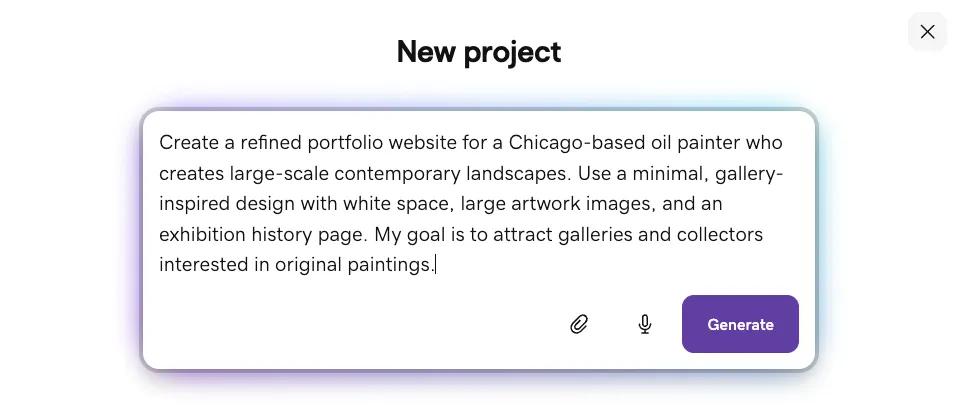
Create a refined portfolio website for a Chicago-based oil painter who creates large-scale contemporary landscapes. Use a minimal, gallery-inspired design with white space, large artwork images, and an exhibition history page. My goal is to attract galleries and collectors interested in original paintings.
Include as much relevant information here as possible, including your medium, style, what your site should include, and the goals that you have for your website. Using the attachment button, you can also attach files, such as your logo or artwork, but you’re also able to include these later in the process.
If you already have a website that you’d like to pull content over to Airo AI Builder from, you can include your URL in the initial prompt as well.
Once you’ve completed and sent your prompt, Airo AI Builder will have follow-up questions before beginning the build. These questions are quick and help Airo AI Builder create a website that more closely matches what you’re looking for.
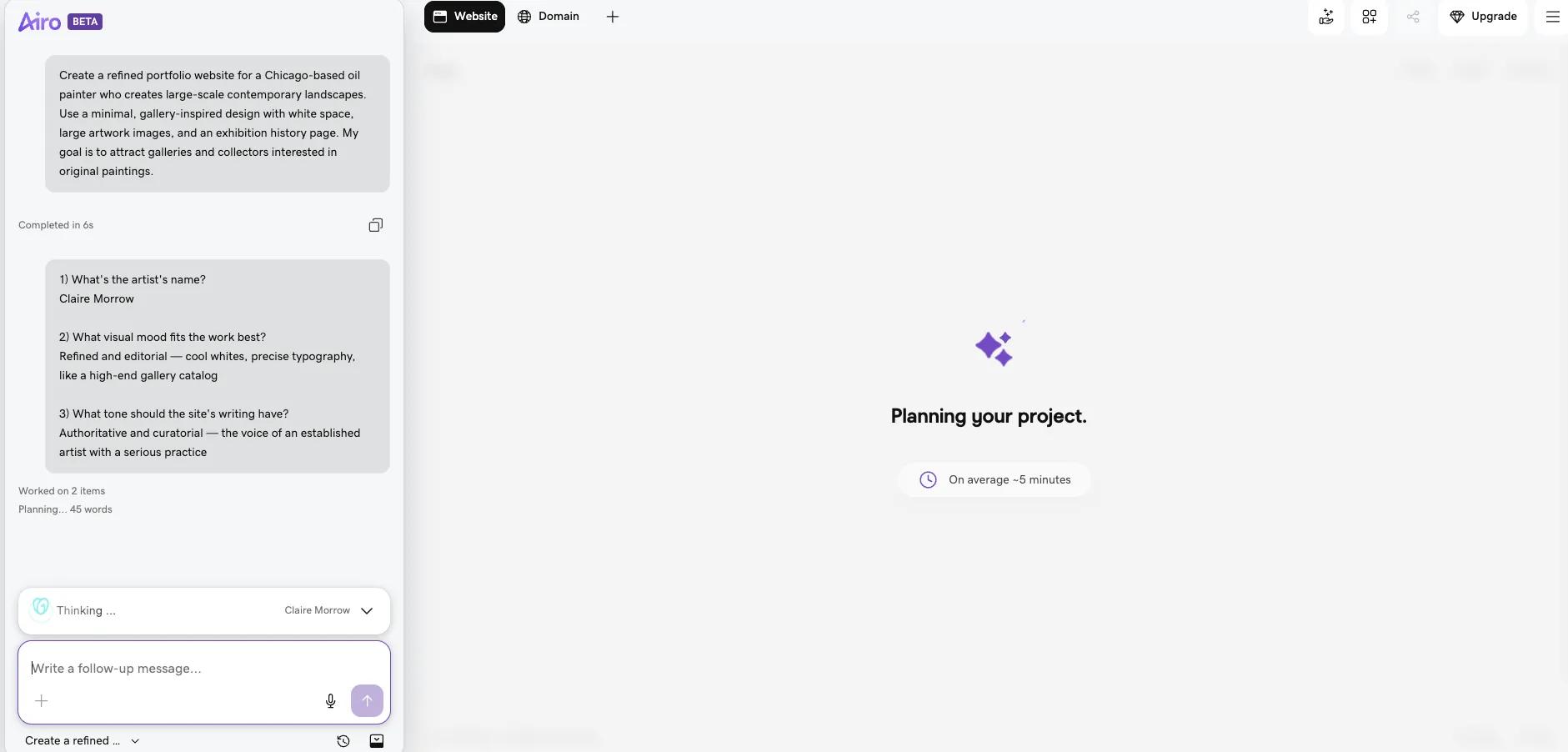
After the questions have been answered, Airo AI Builder will produce a first draft of your website. The pages created are placeholders, so you will need to continue to build out the actual content on your website. Airo AI Builder will prompt you to continue building those placeholder pages, but you can also ask Airo AI Builder to make other edits conversationally.

Here are some examples of how you can modify your site conversationally:
You can continue prompting until you’re happy with the results. Be sure to be as specific as possible to ensure the best results.
Pro tip: Asking Airo AI Builder to make changes, like adding pages, changing the design, or generating new copy, uses AI credits. Basic edits made with the Edit button (or by double-clicking an element in the preview), such as changing text or swapping images, don’t use credits.
This step won’t be required for all artist portfolio websites, since it’ll depend heavily on the goal that you have for your website. Some artists want to be able to sell their art online, while others may only need a portfolio and an events calendar. If you’re not interested in selling art through your portfolio website, feel free to skip this section.
For those that do want to be able to sell their art online, here are some of the options available:
Whichever connector you prefer, you can simply tell Airo AI Builder what you’d like to add and it’ll set it up on your behalf.
Once you’ve built out your pages and configured your online store options (if desired), it’s time to go live. If you haven’t upgraded to a paid plan at this point, you will need to do so before you’ll be able to publish your website. You can click the Upgrade button at the top right to do so.
Once you have a paid plan and you’re ready to make your website live, click on the Publish button at the top right, enter your domain name, and click Publish again.
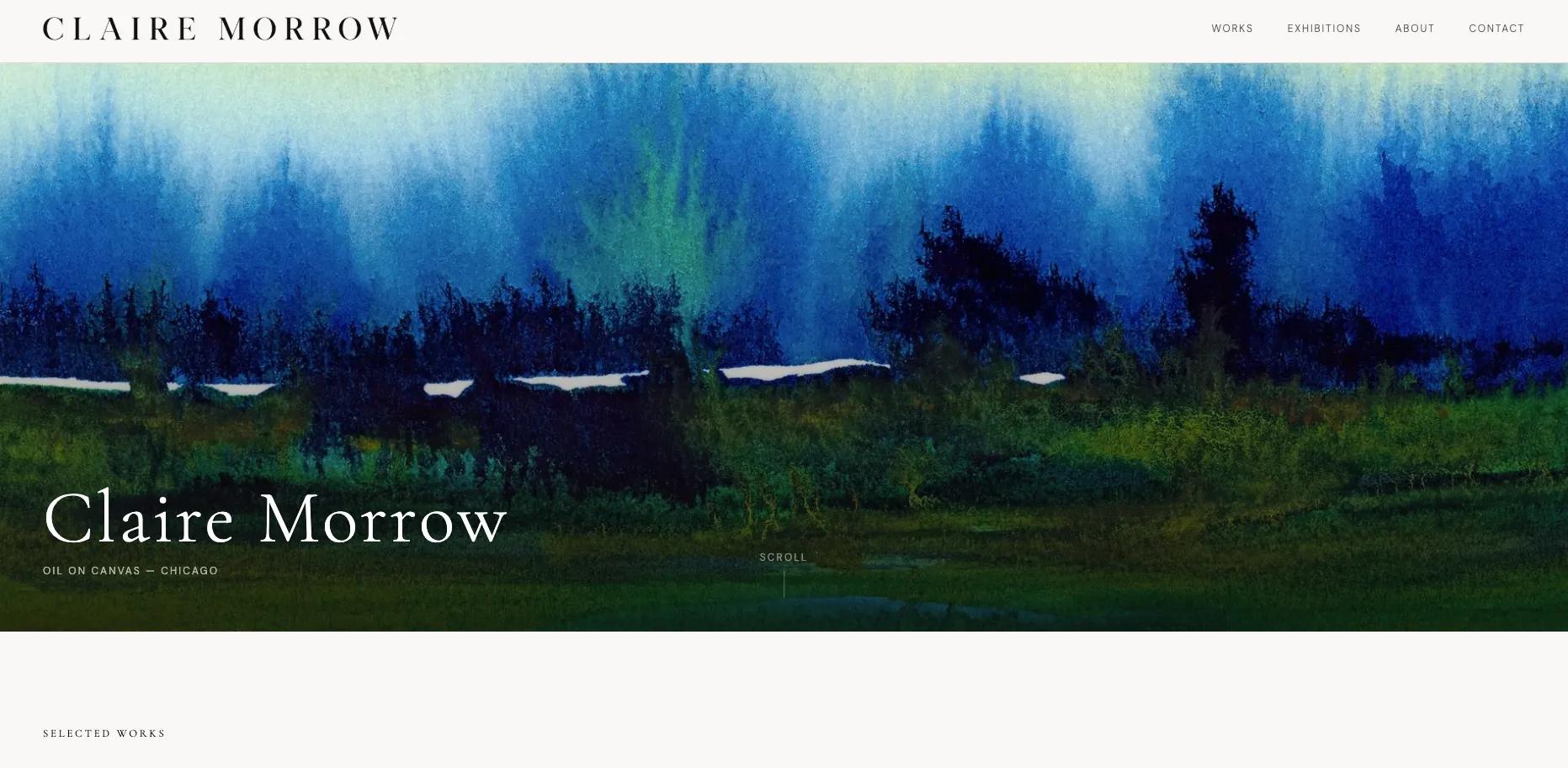
Important note: If your domain is registered in the same GoDaddy account as Airo AI Builder, then your domain’s DNS settings will be configured automatically when publishing. If your domain is registered in a different GoDaddy account, or at a different domain registrar, then additional steps will be required before your site can be live online. See our help guide on how to connect a domain to Airo AI Builder for the steps needed for each domain scenario.
Airo AI Builder also handles the SEO basics for your website as you build out your website, as well as mobile responsiveness, which greatly simplifies your pre-publishing review process.
You’ve put in the work to create a portfolio that represents you well: your strongest pieces are curated, your artwork is photographed with care, and your site has the information visitors need to understand your practice.
Airo AI Builder turns that preparation into a professional portfolio through a simple conversation. Manage your site, domain, gallery, and SEO tools in one place, then refine your presence as your work evolves. Make an art portfolio website with Airo AI Builder and start sharing your work with your audience.
GoDaddy Airo AI Builder
With a few prompts, Airo AI Builder generates your website, web app, pages, databases and logic in minutes — no coding required. Start for free with 50 AI credits a month. No credit card required.
Build for Free
A strong art portfolio website should include a homepage, a gallery of your work, an artist statement, an about page, and clear contact information. Add pages for exhibitions, commissions, an online store, testimonials, or a process journal when they support your goals. You should focus on making it easy for visitors to understand your work and take the next step.
How many pieces should I include in my art portfolio?
Start with 10 to 15 of your strongest, most recent, and most representative pieces. Choose work that reflects the kind of art you want to create more of, rather than including every piece you’ve made. A focused collection makes a stronger impression than a large, uneven gallery.
How do I photograph my artwork for a website?
Use natural, even lighting and photograph flat work straight on to avoid shadows and distortion. Capture high-resolution images against a neutral background, then edit them for color accuracy and optimize copies for web loading speed. Include multiple angles and detail shots for sculptures or other three-dimensional pieces.
Can I sell art directly from my website?
Yes, you can sell original artwork, prints, and digital downloads directly through your art portfolio website. An online store lets you control the way your work is presented, set your own prices, and connect with buyers through your own brand. Airo AI Builder can help you create a store and connect payment options when selling online is part of your plan.
What not to put in an art portfolio?
Avoid including every piece you have ever made, especially work that no longer reflects your current skill level or artistic direction. Leave out low-quality photos, incomplete projects, and unrelated work that makes the portfolio feel scattered. Keep the focus on a cohesive collection that shows visitors what you do best.
*One free available domain with new purchase of an annual Airo AI Builder plan. Plus annual ICANN fee per domain. Domain name must be added to cart before purchase, and selected term must be equal to or less than term of selected plan to qualify for free domain. Additional years billed at current rates. Offer valid for 1st year only; renews at current prices. Invalid with other offers.
The post How to make an art portfolio website with AI appeared first on GoDaddy Blog.
Continue reading...
The good news is that creating that home no longer requires design or coding experience. AI tools can help you organize your ideas, write compelling project descriptions, and build a polished site that feels true to your creative vision.
Let’s explore how to build an art portfolio website step by step with GoDaddy Airo AI Builder, starting with everything you need to do before logging in.
GoDaddy Airo AI Builder
Describe your idea. We’ll build your live website in minutes.
With a few prompts, Airo AI Builder generates your website, web app, pages, databases and logic in minutes — no coding required. Start for free with 50 AI credits a month. No credit card required.
Build for Free
What to prepare before building your website
Before opening an AI website builder, take time to prepare the work and information your site will need. A little upfront planning makes the build faster and gives visitors a clearer picture of your work. An art portfolio website is only as strong as the work, details, and direction you put into it.
Map out your website
Tackle these four essentials before creating your site, then use them to guide the copy, design, and structure.
Write a description of yourself and your art
Your description is the foundation for your website. It helps an AI website builder understand the copy, tone, layout, and visual style that suit your work.
Include details such as:
- The mediums you work in, such as oil painting, watercolor, digital illustration, sculpture, mixed media, or printmaking
- Your style or artistic voice, such as abstract, realism, surrealism, contemporary, or folk art
- Your influences and themes, such as nature, identity, urban landscapes, or mythology
- The people you want to reach, including galleries, collectors, commercial clients, fans, or art directors
- What you want your site to accomplish, such as selling work, attracting commissions, pursuing gallery representation, or building an audience
Giving the AI website builder concrete information about yourself and the portfolio you want to build will lead to a more accurate, personalized website. Leaving things too vague will make the results more generic. For example:
Vague description: “I’m an artist, and I want a portfolio.”
Detailed description: “I’m a contemporary oil painter based in Portland. I create large-scale abstract landscapes inspired by the Pacific Northwest. I want my site to attract collectors and galleries, and I also sell limited-edition prints online.”
This can also be a great starting point for your artist statement later on.
Decide what pages you need
Most art portfolio websites use a similar structure, but the right pages depend on your goals and the ways you share or sell your work. Common options include:
- Homepage
- Gallery or work page
- Artist statement
- About or bio page
- Exhibition history
- Commissions page
- Shop for prints, originals, or digital downloads
- Contact page
- Blog or process journal
You don’t need every page on day one. A strong homepage, gallery, about page, and contact page are enough to launch a professional portfolio site.
Choose what to showcase
Curating your portfolio is one of the most important preparation steps because your work is the centerpiece of the site. Focus on a concise collection that represents the kind of work you want to create and be known for. To do this:
- Select 10-15 of your strongest, most recent, and most representative pieces instead of including everything you have made.
- Choose work that supports the opportunities you want next, such as commissions, gallery placement, or commercial projects.
- Organize artwork into groups by series, medium, or subject if you work across multiple themes or formats.
- Lead with your strongest piece to make a compelling first impression.
- Show a range of skills while keeping the overall collection cohesive.
- Prioritize quality over quantity. A portfolio with 15 excellent pieces can make a stronger impression than one with 100 less-refined works.
Photograph your artwork properly
Digital artists may already have polished files ready to upload, but artists working in physical media need high-quality photos that accurately represent their work online. The quality of those images directly affects how visitors experience your art, so make sure you:
- Use natural, even lighting, and avoid harsh shadows or direct flash.
- Photograph flat work, such as paintings and prints, straight on to prevent distortion.
- Use a neutral background, such as a white or gray wall or a clean surface.
- Capture sculptures and other three-dimensional work from multiple angles.
- Include detail shots to show texture, brushwork, and material quality.
- Edit images for color accuracy so the online version closely matches the original piece.
- Save high-resolution source files, then optimize copies for fast website loading.
A professional photography session can be a worthwhile investment if you cannot capture the work well yourself. Poor photos can undersell even exceptional art.
Pick a domain name
A domain name is your website’s unique address on the internet, like yourname.com. A custom domain gives your art a professional home online. It’s often one of the first things a gallery owner, collector, or art director sees, so choose a name that is easy to remember and clearly connected to your work.
You don’t have to be a domain expert to pick the right one for your portfolio. Just use these tips:
- Use your full name when possible.
- If your name is unavailable, try variations such as your first name plus “art,” your name plus “studio,” or your name plus “gallery.”
- Keep it short, easy to spell, and easy to say aloud.
- Choose a .com domain extension to keep things simple, or opt for something more relevant, like a .art domain extension.
- Avoid hyphens and numbers, which can make a domain harder to remember.
It’s a good idea to search for and register a domain name before building your site so you know it’s available. Airo AI Builder paid plans include a free custom domain*, and existing domains can be connected during the build.
Find your perfect domain name today
SEARCHPrompting tips to make your art portfolio stand out
Think of your prompt as a creative brief for your portfolio. Airo AI Builder uses the description you provide to create a website that reflects your work and goals. The more specific you are about your art, audience, and ideal site, the more tailored the result can be.
- Lead with your medium and style. Describe the kind of artist you are instead of simply saying that you make art. “Abstract acrylic painter” or “botanical watercolor illustrator” gives Airo AI Builder much more useful direction than “I’m an artist.”
- Describe the aesthetic you want for your site. Share the visual feeling you want visitors to experience, such as minimal and gallery-like, warm and earthy, dark and dramatic, or clean and contemporary. Your website design should complement your art, not compete with it.
- Explain how you want to display your work. Tell Airo AI Builder if you prefer large, full-bleed images, a grid gallery, individual pieces with detailed descriptions, or collections organized by series. This helps shape the layout around the way you want visitors to explore your portfolio.
- Be specific about the audience you want to attract. Collectors, galleries, commercial clients, fans, and art directors may look for different information. Naming your intended audience helps Airo AI Builder create the right tone, pages, and calls to action.
- Share the action you want visitors to take. Your site may encourage people to inquire about a piece, commission work, buy a print, or sign up for your mailing list. Airo AI Builder can use that goal to make the next step clear throughout the site.
- Mention colors and branding that already represent your work. Include your usual color palette, logo colors, or the dominant tones in your artwork. This gives Airo AI Builder direction for a site that feels cohesive with your artistic identity.
Need some more guidance? Check out these Airo AI Builder art portfolio prompt examples:
Fine art painter: “Create a refined portfolio website for a Chicago-based oil painter who creates large-scale contemporary landscapes. Use a minimal, gallery-inspired design with white space, large artwork images, and an exhibition history page. My goal is to attract galleries and collectors interested in original paintings.”
Commercial illustrator: “Build a bright, modern portfolio for a botanical watercolor illustrator. I create detailed plant and food illustrations for packaging, editorial work, and product brands. Use a clean grid gallery, warm natural colors, and a clear commissions page for art directors and commercial clients.”
Sculptor: “Create an elegant website for a ceramic sculptor who makes small-batch, nature-inspired pieces. Use an earthy, tactile design with full-width images, separate collections for each series, and a shop where collectors can purchase available work and limited editions.”
Art portfolio website checklist
Use this quick-reference checklist to make sure your art portfolio website includes the elements that support your goals. Not every item applies to every artist, since someone seeking gallery representation may need something different than someone selling prints online. Use the items that fit your work as a guide during the build and as a final check before publishing.
Homepage that showcases your strongest work
Think of your homepage as the entrance to a gallery. Lead with a striking image or a curated selection of your best pieces above the fold, then include your name, what you create, and a clear next step. Keep the design clean, so the artwork remains the focus.
Gallery organized by series, medium, or theme
Your gallery is the lifeblood of the site, so it should be simple to browse on desktop and mobile. Organize work in a way that reflects your practice, such as by series, medium, theme, or most recent work. Give each piece a high-quality image, title, medium, dimensions, year, and availability status when relevant.
Artist statement
An artist statement explains the ideas, themes, and process behind your work. Galleries, curators, and serious collectors often look for it, so keep it concise, written in the first person, and free of unnecessary jargon. Aim for one to three paragraphs focused on the work itself, not your personal background.
About page with your background and bio
Your about page introduces the person behind the art. Share your background, education, training, artistic journey, and location alongside a professional photo of yourself. Galleries and press may pull language from this page, so write a clear description that can stand on its own.
Exhibition history and press
If you’re hoping for gallery representation or institutional shows, include an exhibition history, often called a CV. List solo and group exhibitions in reverse chronological order with the show name, venue, city, and year. Add relevant press coverage, publications, awards, residencies, and collections to show your professional track record.
Commissions or custom work page
Do you make personalized pieces for individual buyers? A dedicated commissions page makes it clear that you are available for custom work and helps potential clients understand the process. Include the types of commissions you accept, a starting price or range, a typical timeline, and an inquiry form that asks for important details, such as size, subject, budget, and deadline.
Online store (prints, originals, digital downloads)
If you plan to sell your work, an online store gives you control over how you present available work and connect with buyers directly through your own site. Airo AI Builder can help you create an online store and connect payment options for selling originals, open-edition prints, limited-edition prints, digital downloads, and more.
Client or collector testimonials
Testimonials from collectors, clients, or gallery owners can build confidence with prospective buyers. A brief quote about the quality of your work, the commission experience, or your professionalism can be especially valuable for people viewing your art online for the first time. Even just two or three strong testimonials can add credibility.
Contact page with a clear call to action
Your contact page should make it easy for interested parties to reach you. Include a contact form, email address, and your preferred method of communication. Match the call to action to your goals, such as “Inquire about a piece,” “Request a commission,” “Gallery representation inquiries,” or “Get in touch.”
Social media links (Instagram, Behance, DeviantArt)
Social media links give visitors another way to follow your work, see studio updates, and stay connected. Depending on your discipline and audience, you might link to Instagram, Behance, DeviantArt, ArtStation, or Pinterest. Make sure you only link to active profiles that represent your current work well.
Blog or process journal
A blog or process journal can keep your website active between new portfolio updates and help more people discover your work through search. Share works in progress, studio updates, exhibition announcements, behind-the-scenes images, or reflections on your creative practice. Regular posts give visitors a reason to return and deepen their connection with your work.
Make an art portfolio website: step by step with Airo AI Builder
With your artwork, photos, website plan, and domain name ready, you can start turning your portfolio into a live website. The steps below show how to create an art portfolio website with Airo AI Builder, GoDaddy’s AI-powered tool for building custom websites through conversation. Tell Airo AI Builder about your art, your goals, and the look you want, then use its guidance to create and refine your site without coding or design experience.
GoDaddy Airo AI Builder
Describe your idea. We’ll build your live website in minutes.
With a few prompts, Airo AI Builder generates your website, web app, pages, databases and logic in minutes — no coding required. Start for free with 50 AI credits a month. No credit card required.
Build for Free
Step 1: Tell Airo AI Builder about yourself and your art
Using the information that you’ve gathered from earlier in this guide, you’ll first need to describe what exactly you’d like Airo AI Builder to create.
Create a refined portfolio website for a Chicago-based oil painter who creates large-scale contemporary landscapes. Use a minimal, gallery-inspired design with white space, large artwork images, and an exhibition history page. My goal is to attract galleries and collectors interested in original paintings.
Include as much relevant information here as possible, including your medium, style, what your site should include, and the goals that you have for your website. Using the attachment button, you can also attach files, such as your logo or artwork, but you’re also able to include these later in the process.
If you already have a website that you’d like to pull content over to Airo AI Builder from, you can include your URL in the initial prompt as well.
Step 2: Answer a few questions
Once you’ve completed and sent your prompt, Airo AI Builder will have follow-up questions before beginning the build. These questions are quick and help Airo AI Builder create a website that more closely matches what you’re looking for.
Step 3: Make edits through follow-up prompts
After the questions have been answered, Airo AI Builder will produce a first draft of your website. The pages created are placeholders, so you will need to continue to build out the actual content on your website. Airo AI Builder will prompt you to continue building those placeholder pages, but you can also ask Airo AI Builder to make other edits conversationally.
Here are some examples of how you can modify your site conversationally:
- “Make the homepage a full-bleed image of my latest painting with just my name”
- “Organize the gallery into three sections: oil paintings, watercolors, and mixed media”
- “Add an artist statement page”
- “Keep the design minimal — white background, lots of space, let the art breathe”
- “Add a commissions page with an inquiry form asking for size, subject, and budget”
You can continue prompting until you’re happy with the results. Be sure to be as specific as possible to ensure the best results.
Pro tip: Asking Airo AI Builder to make changes, like adding pages, changing the design, or generating new copy, uses AI credits. Basic edits made with the Edit button (or by double-clicking an element in the preview), such as changing text or swapping images, don’t use credits.
Step 4: Set up how you want to sell or get support
This step won’t be required for all artist portfolio websites, since it’ll depend heavily on the goal that you have for your website. Some artists want to be able to sell their art online, while others may only need a portfolio and an events calendar. If you’re not interested in selling art through your portfolio website, feel free to skip this section.
For those that do want to be able to sell their art online, here are some of the options available:
- Online store: Sell originals, prints, or digital downloads directly from the site with built-in payment processing through GoDaddy Payments or third-party platform connectors like Stripe or Square (where available).
- Gumroad: Connect for selling digital downloads, prints, or art packs
- Commission inquiry form: For artists who price custom work case by case, a form is all they need instead of a store
- Patreon: Link to membership tiers for fans who want to support ongoing work with exclusive content, early access, or behind-the-scenes updates
Whichever connector you prefer, you can simply tell Airo AI Builder what you’d like to add and it’ll set it up on your behalf.
Step 5: Link your domain and publish
Once you’ve built out your pages and configured your online store options (if desired), it’s time to go live. If you haven’t upgraded to a paid plan at this point, you will need to do so before you’ll be able to publish your website. You can click the Upgrade button at the top right to do so.
Once you have a paid plan and you’re ready to make your website live, click on the Publish button at the top right, enter your domain name, and click Publish again.
Important note: If your domain is registered in the same GoDaddy account as Airo AI Builder, then your domain’s DNS settings will be configured automatically when publishing. If your domain is registered in a different GoDaddy account, or at a different domain registrar, then additional steps will be required before your site can be live online. See our help guide on how to connect a domain to Airo AI Builder for the steps needed for each domain scenario.
Airo AI Builder also handles the SEO basics for your website as you build out your website, as well as mobile responsiveness, which greatly simplifies your pre-publishing review process.
Start your art portfolio website today
You’ve put in the work to create a portfolio that represents you well: your strongest pieces are curated, your artwork is photographed with care, and your site has the information visitors need to understand your practice.
Airo AI Builder turns that preparation into a professional portfolio through a simple conversation. Manage your site, domain, gallery, and SEO tools in one place, then refine your presence as your work evolves. Make an art portfolio website with Airo AI Builder and start sharing your work with your audience.
GoDaddy Airo AI Builder
Describe your idea. We’ll build your live website in minutes.
With a few prompts, Airo AI Builder generates your website, web app, pages, databases and logic in minutes — no coding required. Start for free with 50 AI credits a month. No credit card required.
Build for Free
Art portfolio website FAQ
What should an art portfolio website include?A strong art portfolio website should include a homepage, a gallery of your work, an artist statement, an about page, and clear contact information. Add pages for exhibitions, commissions, an online store, testimonials, or a process journal when they support your goals. You should focus on making it easy for visitors to understand your work and take the next step.
How many pieces should I include in my art portfolio?
Start with 10 to 15 of your strongest, most recent, and most representative pieces. Choose work that reflects the kind of art you want to create more of, rather than including every piece you’ve made. A focused collection makes a stronger impression than a large, uneven gallery.
How do I photograph my artwork for a website?
Use natural, even lighting and photograph flat work straight on to avoid shadows and distortion. Capture high-resolution images against a neutral background, then edit them for color accuracy and optimize copies for web loading speed. Include multiple angles and detail shots for sculptures or other three-dimensional pieces.
Can I sell art directly from my website?
Yes, you can sell original artwork, prints, and digital downloads directly through your art portfolio website. An online store lets you control the way your work is presented, set your own prices, and connect with buyers through your own brand. Airo AI Builder can help you create a store and connect payment options when selling online is part of your plan.
What not to put in an art portfolio?
Avoid including every piece you have ever made, especially work that no longer reflects your current skill level or artistic direction. Leave out low-quality photos, incomplete projects, and unrelated work that makes the portfolio feel scattered. Keep the focus on a cohesive collection that shows visitors what you do best.
*One free available domain with new purchase of an annual Airo AI Builder plan. Plus annual ICANN fee per domain. Domain name must be added to cart before purchase, and selected term must be equal to or less than term of selected plan to qualify for free domain. Additional years billed at current rates. Offer valid for 1st year only; renews at current prices. Invalid with other offers.
The post How to make an art portfolio website with AI appeared first on GoDaddy Blog.
Continue reading...

