


godaddy
New Member
ICANN Accredited Registrar
Domain Marketplace
Domain Broker
Hosting Provider
ICA Member
ISO 27001
- Joined
- Jan 26, 2009
- Messages
- 154
- Reaction score
- 12
Your website is a key part of your customer experience. When it is slow, outdated, or hard to use, visitors may leave and not come back. In fact, 88% of people are less likely to return after a bad website experience. A website redesign can help you update your look, improve the customer journey, and better support your business goals.
A website redesign is a complete overhaul of your site’s structure, visuals, and functionality to improve its performance, usability, and overall impact. It transforms your digital foundation through strategic changes to site architecture, functionality, and user experience to realign your digital presence with key business goals and user needs.
If your website feels outdated or underperforms, a redesign is likely the right move.
If your site works well and simply needs a style update or content polish, a refresh can improve it without starting from scratch.
Website optimization works best when it is approached as an ongoing strategy, not a one-time redesign task. The three pillars below provide a clear framework for prioritizing updates and seeing how each part of your site supports the others.
Experience focuses on how visitors interact with your website. This includes user experience, clear navigation, helpful content, mobile optimization, accessibility, and site performance. A fast, easy-to-use website helps visitors find what they need and take the next step without spending too much time searching.
Growth is about helping your website reach the right people and turn visits into meaningful results. This includes SEO, traffic, visibility, revenue, and conversion rate optimization. Small improvements, like clearer calls to action or better-targeted content, can help your site do more for your business.
Protection focuses on building trust and handling visitor information responsibly. This pillar includes consumer rights, privacy, data protection, and compliance with regulations like the General Data Protection Regulation (GDPR) and California Consumer Privacy Act (CCPA). Strong security practices and clear privacy information can help your customers feel more comfortable doing business with you.
Once you have the basics in place, these optimization areas can help you create a more relevant, reliable experience for your visitors.
A website redesign can involve web design, UX design, or a combination of both. Knowing the difference can help you choose an approach that fits your goals and budget.
Web design shapes the look and feel of your website. It includes your layout, branding, typography, colors, and the way content appears on each page. The goal is to present your information clearly in a polished, on-brand way.
This approach can be a good fit for smaller websites, marketing sites, portfolios, and straightforward B2C pages.
UX design looks beyond visuals to focus on how people use and move through your website. It can include user research, customer journeys, information architecture, wireframes, prototypes, accessibility planning, and detailed documentation. This process helps you create an experience that feels intuitive for the people you want to reach, especially when they need to complete more than one task on your site.
UX design usually takes more time and investment than traditional web design because it involves more research and planning. It can make a meaningful difference for complex projects, including large B2B websites, SaaS platforms, fintech products, AI-powered tools, and corporate sites with several audiences or complicated navigation.
However, a simpler marketing or ecommerce site may only need strong web design to meet your goals. The right choice comes down to what your visitors need to do on your site and how much complexity it needs to support.
Even a well-built website won’t stay effective forever. Technology, design trends, and user expectations evolve quickly, and your site needs to keep up. It might be time for a website redesign if:
GoDaddy Airo AI Builder
With a few prompts, Airo AI Builder generates your website, web app, pages, databases and logic in minutes — no coding required. Start for free with 50 AI credits a month. No credit card required.
Build for Free
A redesign can also move your site onto a modern platform that’s easier to manage and scale.
The timeline for a website redesign depends on your site’s size, complexity, and goals, as well as how you build your site. Traditional redesigns through agencies or developers typically take longer to complete. Those done using AI-powered tools can turn weeks’ worth of work into hours.
Planning and setting clear milestones help keep your website redesign on track. Whether you choose a traditional approach or an AI-powered builder, defined processes and goals ensure every stage runs smoothly and delivers the results you want.
If you’re working with developers, designers, or agencies, you’ll typically see timelines like these:
AI-powered tools like GoDaddy Airo AI Builder dramatically shorten these timelines. Instead of weeks of discovery calls, wireframes, and development sprints, you can describe what you want in plain language and have a fully functional, AI-generated site in minutes.
Here’s what to expect when redesigning with an AI builder:
A website redesign requires strategy, structure, and a clear sense of purpose. Before designing new layouts or visuals, it’s worth taking a step back to review how your current site performs and what your audience actually needs.
Analytics reveal how your website performs. Before changing anything, dig into the data to understand what’s working and what isn’t. This helps you make informed design and content decisions instead of relying on guesswork.
Start by reviewing:
Revenue and traffic metrics can show the bottom-line impact of your redesign, but qualitative metrics reveal how people actually experience your site. Keep an eye on:
Together, these metrics can help you make design and content decisions based on real customer behavior, not guesswork.
Your visitors can tell you what your analytics can’t.
Their feedback highlights what feels easy, what’s confusing, and what’s missing.
Listening early in the process ensures your redesign improves the user experience where it matters most.
You can collect feedback through:
Small changes based on real feedback can make a big difference once your new site goes live.
A redesign without clear goals is just a new coat of paint. Before any design work begins, define what success looks like and how you’ll measure it, so every decision ties back to a real business outcome.
Document those details in a website redesign proposal. This proposal outlines the project’s goals, scope, deliverables, timeline, budget, and the people responsible for each stage. It gives everyone involved a shared understanding of what the redesign includes and helps keep the project on track.
Your goals may include:
Turn each goal into a measurable target, such as reducing bounce rate by 15% or doubling contact form submissions. Your proposal can then be used as a roadmap during the redesign and a benchmark for measuring results after launch.
Before you redesign, look closely at the businesses you compete with online. A competitive review shows you what’s become standard in your industry, where rivals are winning, and where there’s a gap you can own.
As you review competitor sites, note:
The goal isn’t to copy them, but to understand the landscape so your redesign feels current, credible, and distinct.
A redesign is the perfect time to take stock of every page, post, and asset on your current site. A content audit tells you what to keep, what to rewrite, what to merge, and what to retire, so you don’t carry old clutter into your new site.
Create a simple inventory of your existing URLs, then sort each item:
Flag any high-traffic or high-ranking URLs now — you’ll need that list later to set up redirects and protect your search rankings.
Your redesign should express who you are at a glance. Before designers start building layouts, lock in the visual and verbal identity that will be used on every page, including:
Consistent branding across your site — and every other channel — builds recognition and trust. If your branding has recently changed, this is the step that brings your website back in line with it.
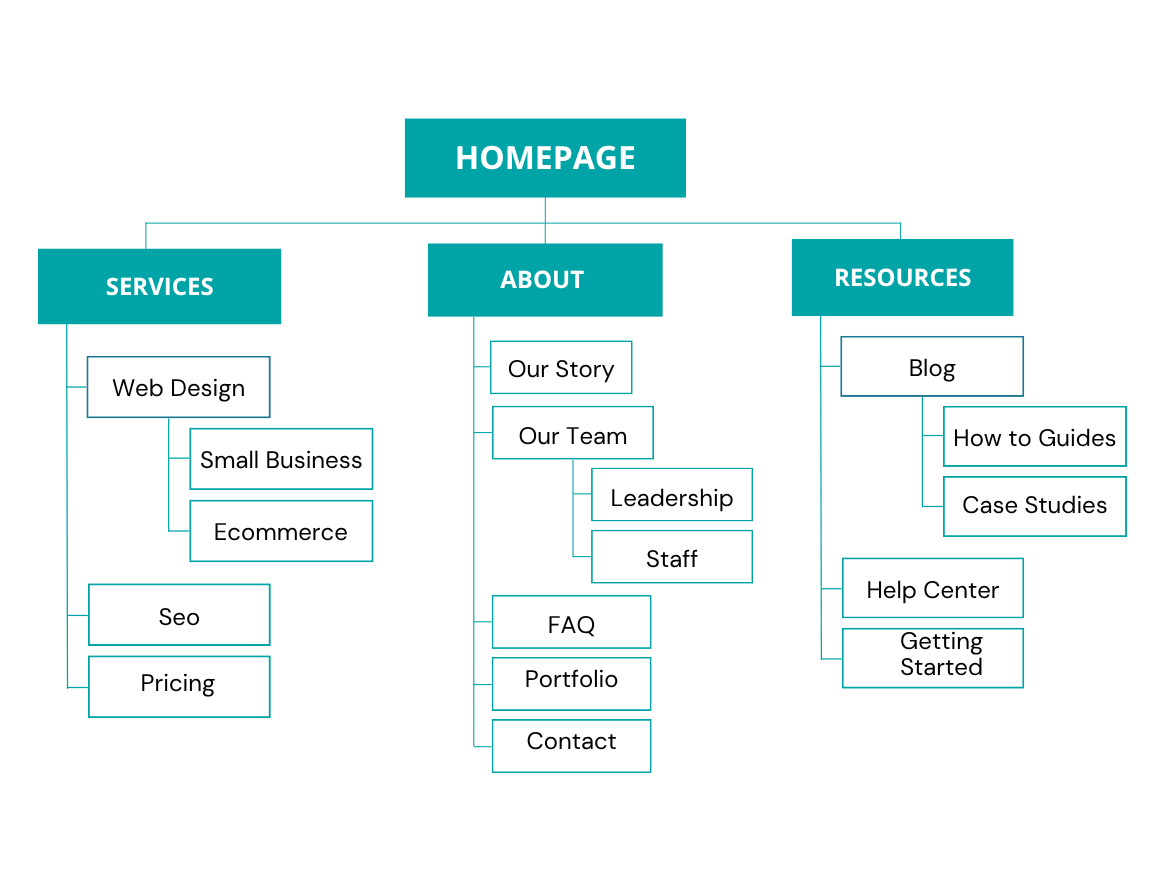
Now that you have mapped out your site structure, it’s time to plan how each page will work. Start with wireframes, which are simple page layouts that show where key elements, content, and calls to action will go.
Next, turn those wireframes into a clickable prototype. This gives you a chance to test the experience before you invest time in visual design or development.
Wireframes and prototypes help you:
Taking the time to test your site’s structure now can help you avoid issues and rework later.
Most of your visitors will browse on a phone, so your redesigned site needs to look and work flawlessly on smaller screens, not just on a desktop. Mobile optimization is no longer optional; it directly affects both user experience and search rankings.
Make sure your new site:
Test your site on a range of real devices to confirm every visitor gets a seamless experience.
Before your new site goes live, put it to the test. Thorough testing catches broken links, form errors, and display issues before your visitors do.
Run through a final checklist:
Fixing problems now protects your first impression and your credibility. You can use automated tools to speed up this process and catch problems sooner than you would be able to manually.
Once testing is complete, it’s time to go live. A smooth launch should be deliberate, not a scramble, so plan the rollout and keep a close eye on things in the first days.
At launch:
After launch, continuously monitor your site so you can iterate quickly and prevent larger issues from taking root. Regular reviews give you the data you need to fine-tune your site for better results over time. Be sure to conduct manual testing as you publish new content and update your website, because new issues can arise that affect performance.
If your current site is holding you back, you don’t need a big budget or a team of developers to fix it. GoDaddy Airo AI Builder lets you rebuild your website from the ground up — just describe your business in plain language and get a modern, mobile-ready site in minutes.
Rebuilding a site you already have? You’re in good company.
Redesigning isn’t only for brand-new businesses. In fact, roughly one in six sites built with Airo AI Builder is a rebuild of a site the owner already had — proof that AAB is built for redesigns, not just first-time launches. If you’ve outgrown your current platform, you’re far from alone, and switching is easier than you might think.
Most people don’t rebuild because they want to — they rebuild because their current setup is getting in the way. If any of these sound familiar, a rebuild is probably overdue:
Airo AI Builder is designed to remove exactly those frictions:
An AI builder isn’t the answer for every project. Here’s a simple way to decide:
A website redesign is one of the highest-impact investments you can make in your business. Done right, it strengthens your brand, guides visitors toward action, protects your search rankings, and turns your site into a tool that actively works for you.
And if your current platform is what’s holding you back, you don’t have to start from scratch or wait weeks to see results. GoDaddy Airo AI Builder lets you rebuild a modern, fast, mobile-ready site in minutes. Just describe your business and let AI do the heavy lifting. Your next website could be live today.
The cost of a website redesign can vary widely depending on your site’s size, features, and goals. A simple redesign for a small business website may cost between $2,000 and $10,000. Larger or more complex sites with custom features, ecommerce functionality, or advanced integrations can range from $15,000 to $50,000 or more. Freelancers cost less, and AI-powered builders like Airo AI Builder let you rebuild your site for a fraction of that — often as part of an affordable subscription.
How often should I do a website redesign?
Most businesses benefit from a full website redesign every two to three years. That timeline allows you to keep up with design trends, technology updates, and changing user expectations. However, if your site’s performance drops, your branding changes, or new features become essential to your business, you may want to start your redesign sooner. Regularly reviewing your analytics and customer feedback will help you decide when a redesign makes the most sense.
What’s the difference between a redesign and a refresh?
A redesign overhauls the foundation of your site — its structure, layout, and functionality — while a refresh focuses on surface-level updates like images, copy, or minor styling tweaks. Choose a redesign when your site is outdated or underperforming, and a refresh when it works well but just needs a light polish.
Will a redesign hurt my SEO rankings?
It can, but only if you skip the SEO groundwork. The biggest risk comes from changing URLs without setting up 301 redirects, which point old links to their new locations so you don’t lose traffic or rankings. Preserve your top-performing content, update your metadata, and submit an updated sitemap after launch. Handled carefully, a redesign can actually improve your rankings.
Can ChatGPT design a website?
No, ChatGPT can’t directly design or build a website, but it can help you plan and organize your redesign. You can use ChatGPT to generate page outlines, write content, brainstorm design ideas, or create SEO-optimized copy for your new site.
The post Website redesign: What it is, when you need it, and how to do it appeared first on GoDaddy Blog.
Continue reading...
What is website redesign?
A website redesign is a complete overhaul of your site’s structure, visuals, and functionality to improve its performance, usability, and overall impact. It transforms your digital foundation through strategic changes to site architecture, functionality, and user experience to realign your digital presence with key business goals and user needs.
If your website feels outdated or underperforms, a redesign is likely the right move.
If your site works well and simply needs a style update or content polish, a refresh can improve it without starting from scratch.
The three pillars of website optimization
Website optimization works best when it is approached as an ongoing strategy, not a one-time redesign task. The three pillars below provide a clear framework for prioritizing updates and seeing how each part of your site supports the others.
Experience
Experience focuses on how visitors interact with your website. This includes user experience, clear navigation, helpful content, mobile optimization, accessibility, and site performance. A fast, easy-to-use website helps visitors find what they need and take the next step without spending too much time searching.
Growth
Growth is about helping your website reach the right people and turn visits into meaningful results. This includes SEO, traffic, visibility, revenue, and conversion rate optimization. Small improvements, like clearer calls to action or better-targeted content, can help your site do more for your business.
Protection
Protection focuses on building trust and handling visitor information responsibly. This pillar includes consumer rights, privacy, data protection, and compliance with regulations like the General Data Protection Regulation (GDPR) and California Consumer Privacy Act (CCPA). Strong security practices and clear privacy information can help your customers feel more comfortable doing business with you.
Additional optimization considerations: SEO best practices
Once you have the basics in place, these optimization areas can help you create a more relevant, reliable experience for your visitors.
- Website personalization: Tailor content, recommendations, or calls to action to match a visitor’s needs, interests, or stage in the customer journey.
- Website internationalization: Adapt your website for visitors in different countries with region-relevant content, languages, currencies, and other local details.
- Website hosting optimization: Make the most of your hosting resources by managing databases, files, and server capacity efficiently. A well-optimized hosting setup can help improve site speed and reliability.
UX design vs web design: Understanding the difference
A website redesign can involve web design, UX design, or a combination of both. Knowing the difference can help you choose an approach that fits your goals and budget.
What web design focuses on
Web design shapes the look and feel of your website. It includes your layout, branding, typography, colors, and the way content appears on each page. The goal is to present your information clearly in a polished, on-brand way.
This approach can be a good fit for smaller websites, marketing sites, portfolios, and straightforward B2C pages.
What UX design focuses on
UX design looks beyond visuals to focus on how people use and move through your website. It can include user research, customer journeys, information architecture, wireframes, prototypes, accessibility planning, and detailed documentation. This process helps you create an experience that feels intuitive for the people you want to reach, especially when they need to complete more than one task on your site.
Which approach is right for your project?
UX design usually takes more time and investment than traditional web design because it involves more research and planning. It can make a meaningful difference for complex projects, including large B2B websites, SaaS platforms, fintech products, AI-powered tools, and corporate sites with several audiences or complicated navigation.
However, a simpler marketing or ecommerce site may only need strong web design to meet your goals. The right choice comes down to what your visitors need to do on your site and how much complexity it needs to support.
When do you need to redesign your website?
Even a well-built website won’t stay effective forever. Technology, design trends, and user expectations evolve quickly, and your site needs to keep up. It might be time for a website redesign if:
- Your site looks outdated: If your design hasn’t changed in years, it may not reflect your current brand or meet modern design standards. A fresh design helps your business stay relevant and credible.
- It isn’t mobile-friendly: Most visitors now browse on their phones. If your site doesn’t adjust smoothly to different screen sizes, you’re likely losing traffic and conversions.
- Navigation feels confusing: A clunky menu or too many clicks to find information can frustrate users. A redesign can streamline your structure and improve the overall user experience.
- Pages load slowly: Speed is critical for both user satisfaction and search rankings. In fact, even a two-second delay can cause visitors to leave. A redesign can optimize performance and fix underlying technical issues.
- Your branding has changed: A new logo, color palette, or messaging means your website should evolve too. Consistent branding across all channels strengthens trust and recognition.
- Conversions are dropping: If your website isn’t generating leads or sales like it used to, a redesign can help you refine your layout, calls to action, and overall funnel to improve results.
- It’s difficult to update: Outdated platforms or hard-to-use content management systems can slow you down. A redesign can move your site onto a modern platform that’s easier to manage and scale.
- It doesn’t meet compliance requirements: An accessible website helps more people use your site comfortably. It can also help protect your business; ADA-related website accessibility lawsuits increased by 23.84% in 2025. Make your navigation keyboard-friendly, add descriptive alt text to all images, and ensure color contrast adheres to WCAG accessibility guidelines.
GoDaddy Airo AI Builder
Describe your idea. We’ll build your live website in minutes.
With a few prompts, Airo AI Builder generates your website, web app, pages, databases and logic in minutes — no coding required. Start for free with 50 AI credits a month. No credit card required.
Build for Free
A redesign can also move your site onto a modern platform that’s easier to manage and scale.
How long does a website redesign take?
The timeline for a website redesign depends on your site’s size, complexity, and goals, as well as how you build your site. Traditional redesigns through agencies or developers typically take longer to complete. Those done using AI-powered tools can turn weeks’ worth of work into hours.
Planning and setting clear milestones help keep your website redesign on track. Whether you choose a traditional approach or an AI-powered builder, defined processes and goals ensure every stage runs smoothly and delivers the results you want.
Traditional website redesign timelines
If you’re working with developers, designers, or agencies, you’ll typically see timelines like these:
| Project Scope | Description | Estimated Timeline |
|---|---|---|
| Small website | Basic sites with fewer than 10 pages and limited functionality. Usually involves updating visuals, improving navigation, and optimizing performance. | 4-6 weeks |
| Medium website | Sites with 10–50 pages or moderate features like forms, blogs, or integrations. Often includes UX updates, content restructuring, and mobile optimization. | 8-12 weeks |
| Large website | Complex sites with 50+ pages, ecommerce functionality, or custom development. Requires strategy, content creation, testing, and multiple rounds of review. | 3-6 months |
| Enterprise website | Extensive sites with advanced integrations, multiple stakeholders, and specialized functionality. Involves detailed planning, design systems, and phased rollouts. | 6-12 months |
Redesigning with AI website builders
AI-powered tools like GoDaddy Airo AI Builder dramatically shorten these timelines. Instead of weeks of discovery calls, wireframes, and development sprints, you can describe what you want in plain language and have a fully functional, AI-generated site in minutes.
Here’s what to expect when redesigning with an AI builder:
| Project Scope | Description | Estimated Timeline |
|---|---|---|
| Simple landing page | Single-page sites or basic marketing pages with minimal functionality. | 30 minutes – 1 hour |
| Small business website | Multi-page sites with standard features like contact forms, about pages, and service listings. | 3–6 hours |
| Feature-rich website | Sites with user registration, payments, ecommerce, or database functionality. | 1–2 days |
How to redesign your website step by step
A website redesign requires strategy, structure, and a clear sense of purpose. Before designing new layouts or visuals, it’s worth taking a step back to review how your current site performs and what your audience actually needs.
Review analytics
Analytics reveal how your website performs. Before changing anything, dig into the data to understand what’s working and what isn’t. This helps you make informed design and content decisions instead of relying on guesswork.
Start by reviewing:
- Traffic sources: Find out where your visitors are coming from.
- Bounce rate: See which pages might be turning users away.
- Average session duration: Measure how long people stay and engage.
- Top-performing pages: Identify what’s already resonating with your audience.
- Conversion rate: Learn how often visitors complete key actions.
- Page load times: Check for delays that could be costing you visitors.
Revenue and traffic metrics can show the bottom-line impact of your redesign, but qualitative metrics reveal how people actually experience your site. Keep an eye on:
- Support ticket volume: A decrease after your redesign can signal that visitors are finding answers more easily.
- Customer Satisfaction Score (CSAT): Measure how satisfied customers are with their experience.
- Net Promoter Score (NPS): Track how likely customers are to recommend your business.
- Customer Effort Score (CES): Learn how easy it is for customers to complete a task on your site.
Together, these metrics can help you make design and content decisions based on real customer behavior, not guesswork.
Gather user feedback
Your visitors can tell you what your analytics can’t.
Their feedback highlights what feels easy, what’s confusing, and what’s missing.
Listening early in the process ensures your redesign improves the user experience where it matters most.
You can collect feedback through:
- Surveys and polls to hear directly from your audience.
- User interviews to uncover deeper insights about behavior and expectations.
- Heatmaps to visualize how people interact with your site.
- Usability testing to see real users navigate your pages.
- Support tickets or chat logs to spot repeat frustrations.
Small changes based on real feedback can make a big difference once your new site goes live.
Set your redesign goals and create a plan
A redesign without clear goals is just a new coat of paint. Before any design work begins, define what success looks like and how you’ll measure it, so every decision ties back to a real business outcome.
Document those details in a website redesign proposal. This proposal outlines the project’s goals, scope, deliverables, timeline, budget, and the people responsible for each stage. It gives everyone involved a shared understanding of what the redesign includes and helps keep the project on track.
Your goals may include:
- More conversions: Generate more leads, sales, or sign-ups.
- Better usability: Make it easier for visitors to find what they need.
- A stronger brand: Present a modern, consistent, trustworthy image.
- Improved performance: Load faster and rank higher in search.
Turn each goal into a measurable target, such as reducing bounce rate by 15% or doubling contact form submissions. Your proposal can then be used as a roadmap during the redesign and a benchmark for measuring results after launch.
Research your competitors
Before you redesign, look closely at the businesses you compete with online. A competitive review shows you what’s become standard in your industry, where rivals are winning, and where there’s a gap you can own.
As you review competitor sites, note:
- Structure and navigation: How do they organize pages and guide visitors to key actions?
- Design and tone: What visual style and messaging do they use, and how do you want to stand apart?
- Features and content: What tools, resources, or content types do they offer that you don’t?
- Strengths and weaknesses: What works well that you can learn from, and what frustrates users that you can do better?
The goal isn’t to copy them, but to understand the landscape so your redesign feels current, credible, and distinct.
Audit your existing content
A redesign is the perfect time to take stock of every page, post, and asset on your current site. A content audit tells you what to keep, what to rewrite, what to merge, and what to retire, so you don’t carry old clutter into your new site.
Create a simple inventory of your existing URLs, then sort each item:
- Keep: High-performing, accurate pages that still serve your goals.
- Improve: Useful content that needs updating, rewriting, or refreshing.
- Consolidate: Overlapping pages that would be stronger combined into one.
- Remove: Outdated, duplicate, or low-value pages you no longer need.
Flag any high-traffic or high-ranking URLs now — you’ll need that list later to set up redirects and protect your search rankings.
Define your branding, visual language, and messaging
Your redesign should express who you are at a glance. Before designers start building layouts, lock in the visual and verbal identity that will be used on every page, including:
- Logo and colors: A consistent palette that reflects your brand personality.
- Typography: Fonts that are readable and on-brand across devices.
- Imagery and style: The look and feel of photos, icons, and graphics.
- Voice and messaging: The tone and key messages that speak to your audience.
Consistent branding across your site — and every other channel — builds recognition and trust. If your branding has recently changed, this is the step that brings your website back in line with it.
Wireframe and prototype
Now that you have mapped out your site structure, it’s time to plan how each page will work. Start with wireframes, which are simple page layouts that show where key elements, content, and calls to action will go.
Next, turn those wireframes into a clickable prototype. This gives you a chance to test the experience before you invest time in visual design or development.
Wireframes and prototypes help you:
- Focus on layout and flow without the distraction of visual design.
- Catch usability issues early, when they’re cheap and easy to fix.
- Align stakeholders on structure before committing to development.
- Test real interactions with a clickable prototype before you build.
Taking the time to test your site’s structure now can help you avoid issues and rework later.
Optimize the mobile experience
Most of your visitors will browse on a phone, so your redesigned site needs to look and work flawlessly on smaller screens, not just on a desktop. Mobile optimization is no longer optional; it directly affects both user experience and search rankings.
Make sure your new site:
- Adapts smoothly to any screen size with responsive design.
- Loads quickly on mobile connections.
- Uses tap-friendly buttons and easy-to-read text.
- Keeps forms and checkouts simple for small screens.
Test your site on a range of real devices to confirm every visitor gets a seamless experience.
Test everything before you launch
Before your new site goes live, put it to the test. Thorough testing catches broken links, form errors, and display issues before your visitors do.
Run through a final checklist:
- Links and buttons: Confirm everything points where it should.
- Forms and checkout: Test every form, payment, and confirmation flow.
- Cross-browser and cross-device: Check how the site renders everywhere.
- Page speed: Verify load times across pages.
- Usability: Have real users navigate key tasks and flag friction.
Fixing problems now protects your first impression and your credibility. You can use automated tools to speed up this process and catch problems sooner than you would be able to manually.
Launch, review, and share
Once testing is complete, it’s time to go live. A smooth launch should be deliberate, not a scramble, so plan the rollout and keep a close eye on things in the first days.
At launch:
- Confirm your redirects and analytics are firing correctly.
- Do a final live review of key pages and flows.
- Announce the new site to your audience via email and social channels.
- Watch closely for any issues in the first 24–48 hours.
After launch, continuously monitor your site so you can iterate quickly and prevent larger issues from taking root. Regular reviews give you the data you need to fine-tune your site for better results over time. Be sure to conduct manual testing as you publish new content and update your website, because new issues can arise that affect performance.
Redesign your existing website with GoDaddy Airo AI Builder
If your current site is holding you back, you don’t need a big budget or a team of developers to fix it. GoDaddy Airo AI Builder lets you rebuild your website from the ground up — just describe your business in plain language and get a modern, mobile-ready site in minutes.
Rebuilding a site you already have? You’re in good company.
Redesigning isn’t only for brand-new businesses. In fact, roughly one in six sites built with Airo AI Builder is a rebuild of a site the owner already had — proof that AAB is built for redesigns, not just first-time launches. If you’ve outgrown your current platform, you’re far from alone, and switching is easier than you might think.
Common frustrations with other website builders and CMSes
Most people don’t rebuild because they want to — they rebuild because their current setup is getting in the way. If any of these sound familiar, a rebuild is probably overdue:
- It’s hard and slow to update. Rigid templates and clunky editors make simple changes a chore.
- The site loads too slowly. Bloated platforms drag down speed, and rankings and conversions with it.
- It isn’t truly mobile-friendly. Your site looks off or breaks on phones and tablets.
- Your tools are scattered. Hosting, domain, email, SEO, and marketing all live in different places.
- You depend on a developer for everything. Even minor edits mean waiting on someone else — or paying for them.
How Airo AI Builder solves them
Airo AI Builder is designed to remove exactly those frictions:
- Rebuild in plain language. Describe your business and Airo generates a complete, professional site — no design or coding skills required.
- Fast by default. Sites are built to load quickly and perform well out of the box.
- Mobile-ready automatically. Your site adapts to every screen without extra work.
- Everything in one place. Domain, hosting, email, SEO tools, and marketing all live under one roof.
- You stay in control. Make edits yourself, anytime, without waiting on a developer.
AI builder vs. traditional redesign: which is right for you?
An AI builder isn’t the answer for every project. Here’s a simple way to decide:
- Choose Airo AI Builder if you’re a small business, freelancer, or marketing/ecommerce site that wants a fast, affordable, professional rebuild you can manage yourself.
- Choose a traditional redesign if you’re building a large, complex site — like a corporate B2B platform, SaaS product, or site with heavy custom functionality — that needs deep UX research and custom development.
Transform your website today
A website redesign is one of the highest-impact investments you can make in your business. Done right, it strengthens your brand, guides visitors toward action, protects your search rankings, and turns your site into a tool that actively works for you.
And if your current platform is what’s holding you back, you don’t have to start from scratch or wait weeks to see results. GoDaddy Airo AI Builder lets you rebuild a modern, fast, mobile-ready site in minutes. Just describe your business and let AI do the heavy lifting. Your next website could be live today.
Frequently asked questions
How much does a website redesign cost?The cost of a website redesign can vary widely depending on your site’s size, features, and goals. A simple redesign for a small business website may cost between $2,000 and $10,000. Larger or more complex sites with custom features, ecommerce functionality, or advanced integrations can range from $15,000 to $50,000 or more. Freelancers cost less, and AI-powered builders like Airo AI Builder let you rebuild your site for a fraction of that — often as part of an affordable subscription.
How often should I do a website redesign?
Most businesses benefit from a full website redesign every two to three years. That timeline allows you to keep up with design trends, technology updates, and changing user expectations. However, if your site’s performance drops, your branding changes, or new features become essential to your business, you may want to start your redesign sooner. Regularly reviewing your analytics and customer feedback will help you decide when a redesign makes the most sense.
What’s the difference between a redesign and a refresh?
A redesign overhauls the foundation of your site — its structure, layout, and functionality — while a refresh focuses on surface-level updates like images, copy, or minor styling tweaks. Choose a redesign when your site is outdated or underperforming, and a refresh when it works well but just needs a light polish.
Will a redesign hurt my SEO rankings?
It can, but only if you skip the SEO groundwork. The biggest risk comes from changing URLs without setting up 301 redirects, which point old links to their new locations so you don’t lose traffic or rankings. Preserve your top-performing content, update your metadata, and submit an updated sitemap after launch. Handled carefully, a redesign can actually improve your rankings.
| Old URL | New URL | Redirect Type |
|---|---|---|
| example.com/services.html | example.com/services/ | 301 Redirect |
| example.com/about-us.html | example.com/about/ | 301 Redirect |
| example.com/blog/post1.html | example.com/blog/how-to-redesign-a-website/ | 301 Redirect |
No, ChatGPT can’t directly design or build a website, but it can help you plan and organize your redesign. You can use ChatGPT to generate page outlines, write content, brainstorm design ideas, or create SEO-optimized copy for your new site.
The post Website redesign: What it is, when you need it, and how to do it appeared first on GoDaddy Blog.
Continue reading...



