


godaddy
New Member
ICANN Accredited Registrar
Domain Marketplace
Domain Broker
Hosting Provider
ICA Member
ISO 27001
- Joined
- Jan 26, 2009
- Messages
- 145
- Reaction score
- 12
WordPress 7.0 ships April 9, 2026 at WordCamp Asia Contributor Day — the first major release of 2026 and the beginning of a restored three-release-per-year cadence. This release moves Phase 3 (Collaboration) of the WordPress block editor roadmap firmly into production, pairing real-time multi-user editing with visual revisions, new blocks, an AI client infrastructure, and a modernized admin experience.
If you manage client sites, this one matters. Real-time collaboration changes how post locking works. Viewport-based block visibility adds a new content control layer. The iframed editor’s detection logic has shifted. Pattern editing defaults have changed.
Set up a staging environment and run your standard client workflows against the 7.0 beta before rolling it out. Pay special attention to any plugins that use classic meta boxes (collaboration disables itself when those are present), custom blocks that haven’t updated to Block API version 3, and any patterns you’ve built for client sites.
If your agency runs on GoDaddy Managed WordPress Hosting, you can deploy WordPress 7.0 betas directly to your staging site — no plugins or local setup needed. From the Hub, open your site’s Settings tab and use the WordPress version selector on your staging environment to switch to 7.0-beta3 (or the latest available beta/RC). Your production site stays untouched while you test.
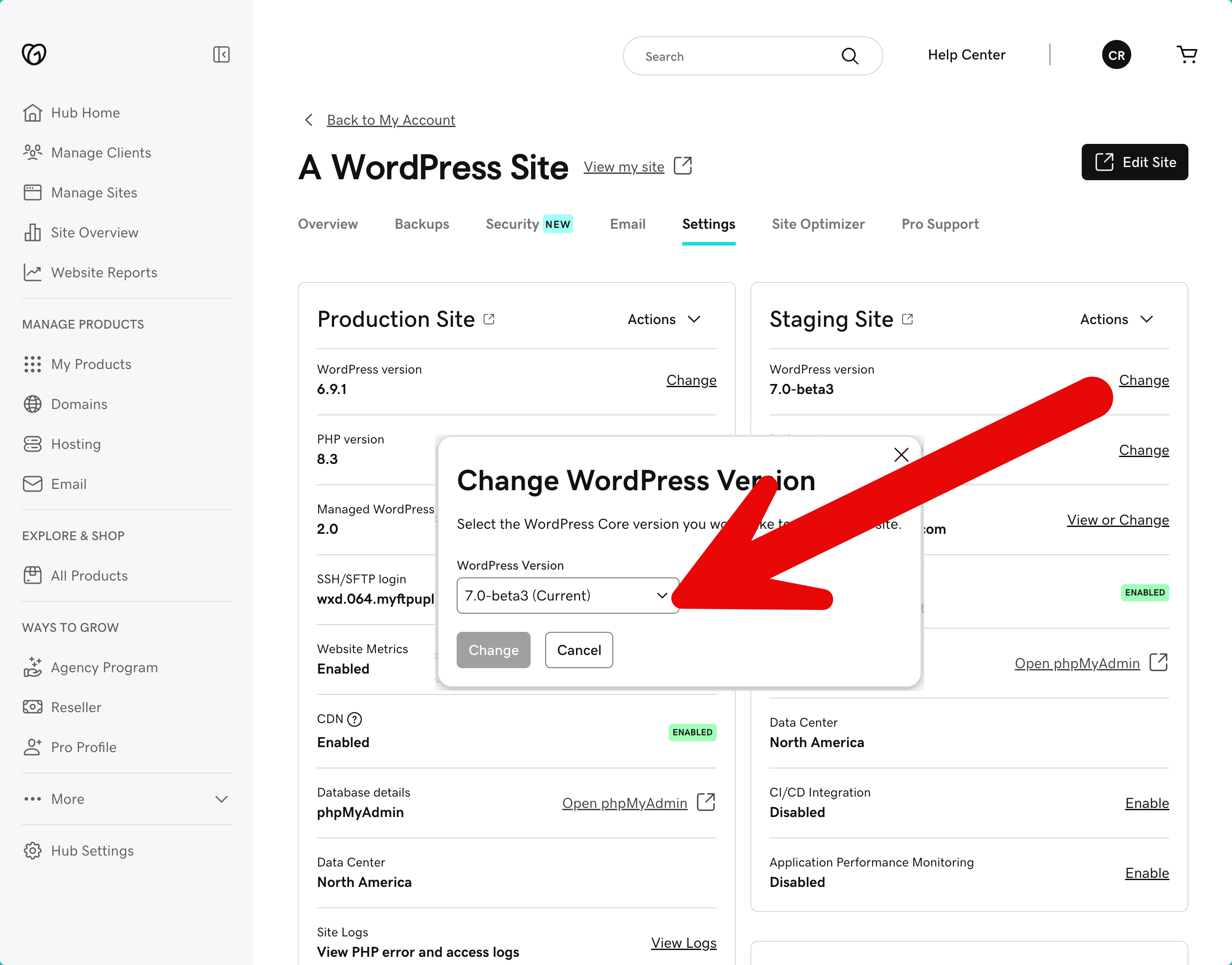
For other hosting setups, install the WordPress Beta Tester plugin on a staging or local site.
You can also spin up an instant test environment at playground.wordpress.net/release — that build comes pre-loaded with testing plugins and sample content so you can start exercising 7.0 features immediately. The official Help Test WordPress 7.0 post has specific testing scenarios.
Multiple users can edit the same post at the same time, with changes syncing in real time. The implementation uses Yjs for conflict-free data merging, with an HTTP polling sync provider shipping by default.
For agencies, the practical shift is this: posts no longer lock when a second editor opens them. Instead, both editors see each other’s changes live. This is opt-in during the beta period to allow broader testing. The real-time collaboration dev note covers the technical architecture, plugin compatibility guidance, and the
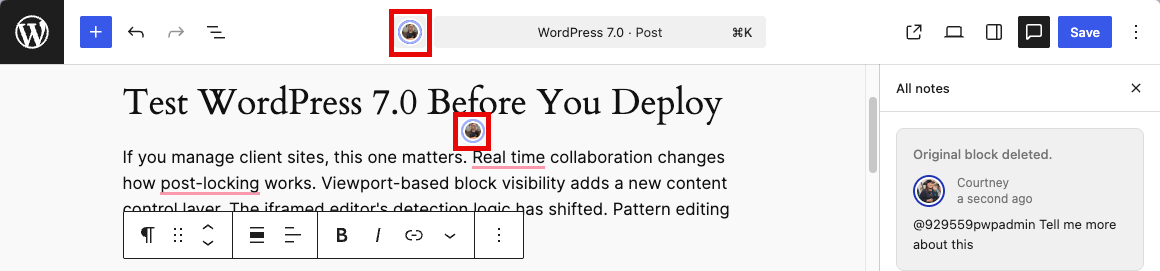
One critical caveat: Classic meta boxes are not synced. If a post has meta boxes present, collaboration disables itself and falls back to standard post locking. Developers should migrate meta box functionality to registered post meta with
If you need to disable collaboration entirely — during a phased rollout across client sites, for example — the
import { addFilter } from '@wordpress/hooks';
addFilter( 'sync.providers', 'my-plugin/disable-collab', () => [] );
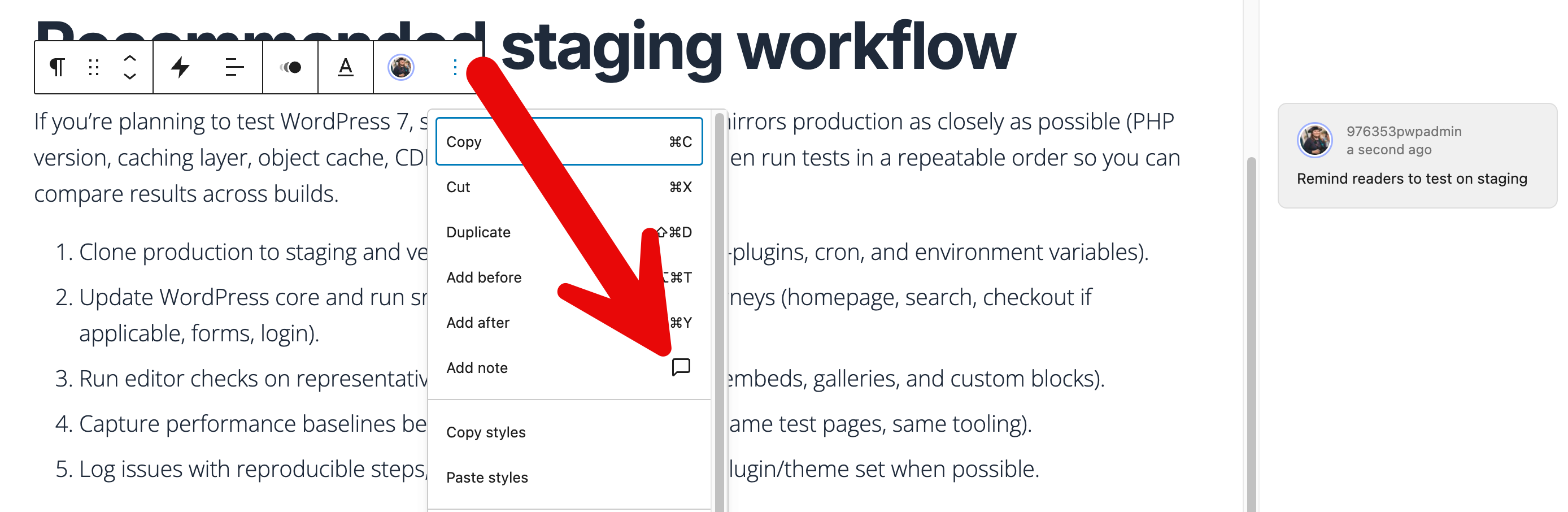
WordPress 6.9 introduced Notes — block-level comments that let editorial teams leave contextual feedback directly on content inside the editor. Notes never appear on the frontend. You can reply in threads, resolve conversations, and keep review workflows inside WordPress instead of routing them through email or external tools. The Notes documentation covers setup and permissions.
WordPress 7.0 hardens the Notes foundation with reliability fixes. The most visible addition: email notifications now fire when someone adds a note to a post you authored, keeping asynchronous review workflows moving even when collaborators aren’t in the editor at the same time. Other fixes prevent notes from incorrectly incrementing the post’s comment count or appearing on the Comments admin screen.
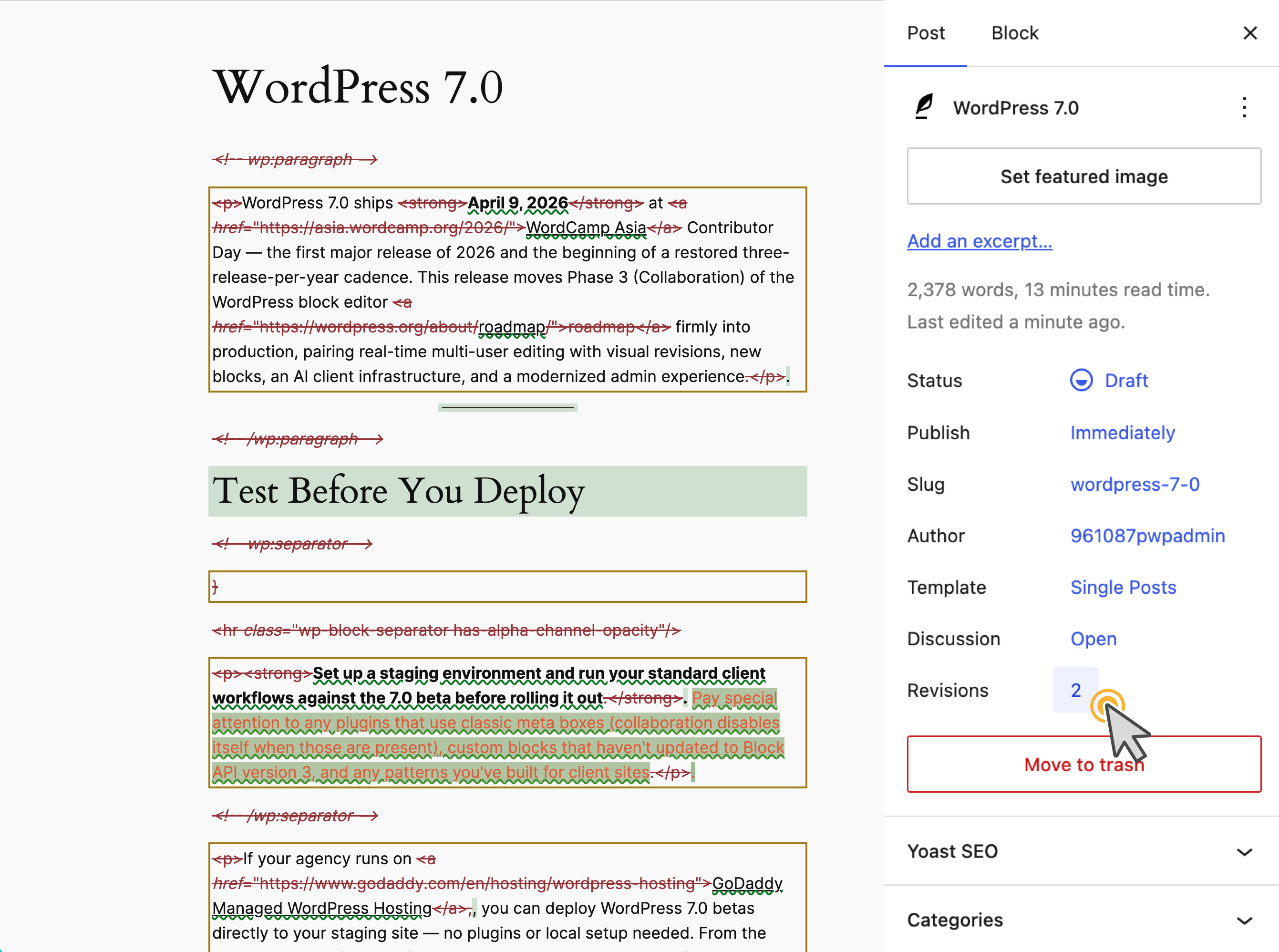
The revisions interface gets a full rethink. Instead of the classic comparison screen, revisions now display inline in the editor with block-level red/green diff highlighting. A sidebar banner flags where on the page changes occurred. The editor enters a distraction-free comparison mode — you can only restore or exit, no accidental edits mid-review. Tracking issue: #74742.
Breadcrumbs block: The new Breadcrumbs block renders hierarchical navigation paths based on the current page, post, archive, or template context.
[IMG alt="Breadcrumbs block in WordPress 7.0 is a sub-navigation method
"]https://www.godaddy.com/resources/wp-content/uploads/2026/03/breadcrumbs.png[/IMG]
It supports primary category selection for multi-category posts, a filter hook for overriding the breadcrumb array, and customizable separator icons. Default styling is minimal, giving theme authors full design control. The breadcrumb block filters dev note documents two PHP filters —
add_filter( 'block_core_breadcrumbs_items', function( $items ) {
// Replace "Home" label with a custom site name
$items[0]['label'] = 'My Agency Site';
return $items;
} );
Icon block: The new Icon block ships with a default set from the
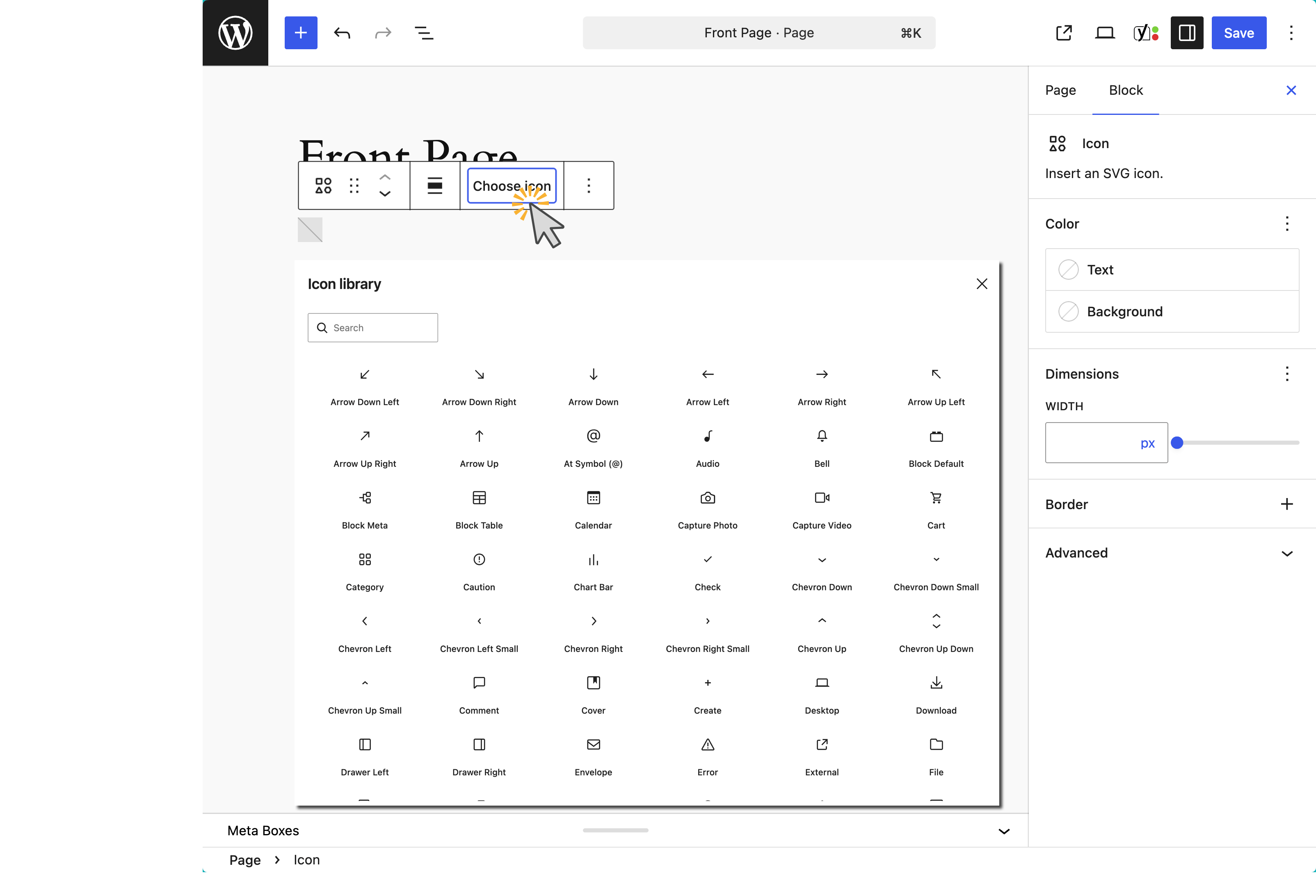
It fills a long-standing gap — previously, adding icons to content required custom HTML blocks or third-party plugins. Tracking issue: #16484.
The Gallery block now supports a lightbox overlay with image-to-image navigation. Click any gallery image to open it full-screen, then navigate between images with keyboard or pointer. Tracking issue: #56310.
This one requires attention. Unsynced patterns and template parts now default to content-only mode when inserted into the editor. You can edit text and media, but the block structure and style controls are hidden by default. This prevents accidental layout changes — a common pain point — but it’s a behavioral shift from previous versions where users had full block access. An “Edit section” button provides access to the full structure when needed. See the call for testing.


The Navigation block’s mobile overlay — the hamburger menu — is now a template part you can edit with blocks and patterns. Add branding, calls-to-action, images, or custom styling directly inside the overlay using the same tools you use for the rest of the site. Themes can ship their own overlay variations, and agencies can build client-specific mobile menus without custom code.
An overlay template part selector in the Navigation block settings lets you choose which template part powers the mobile menu. Because overlays are saved as template parts, changes apply site-wide — update once, deploy everywhere. The customizable navigation overlays dev note covers the full implementation.
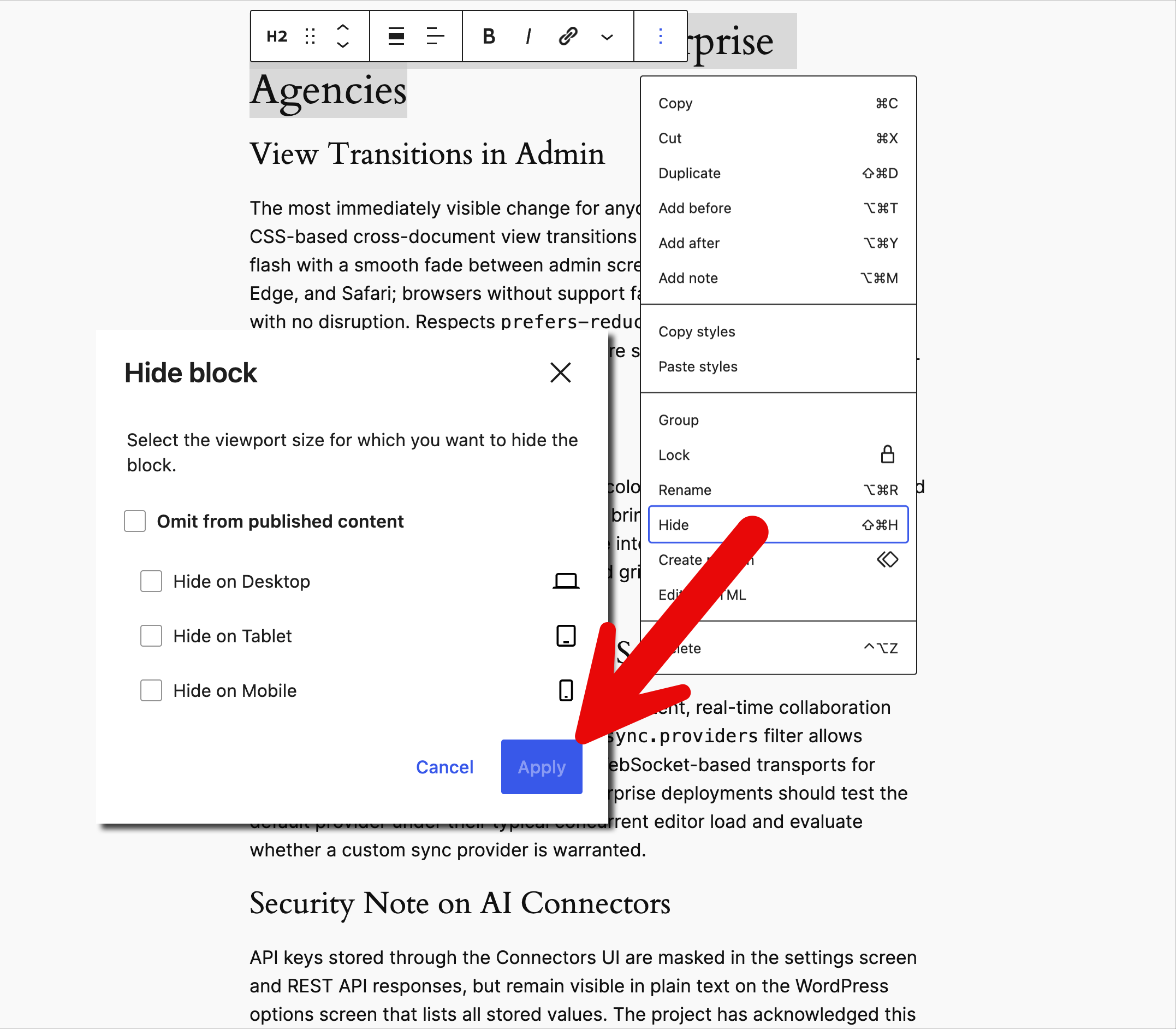
Viewport-based block visibility lets you show or hide any block by screen size — the control lives under the block toolbar, block inspector sidebar, and command palette. The viewport-hidden blocks are rendered in the DOM with CSS hiding,
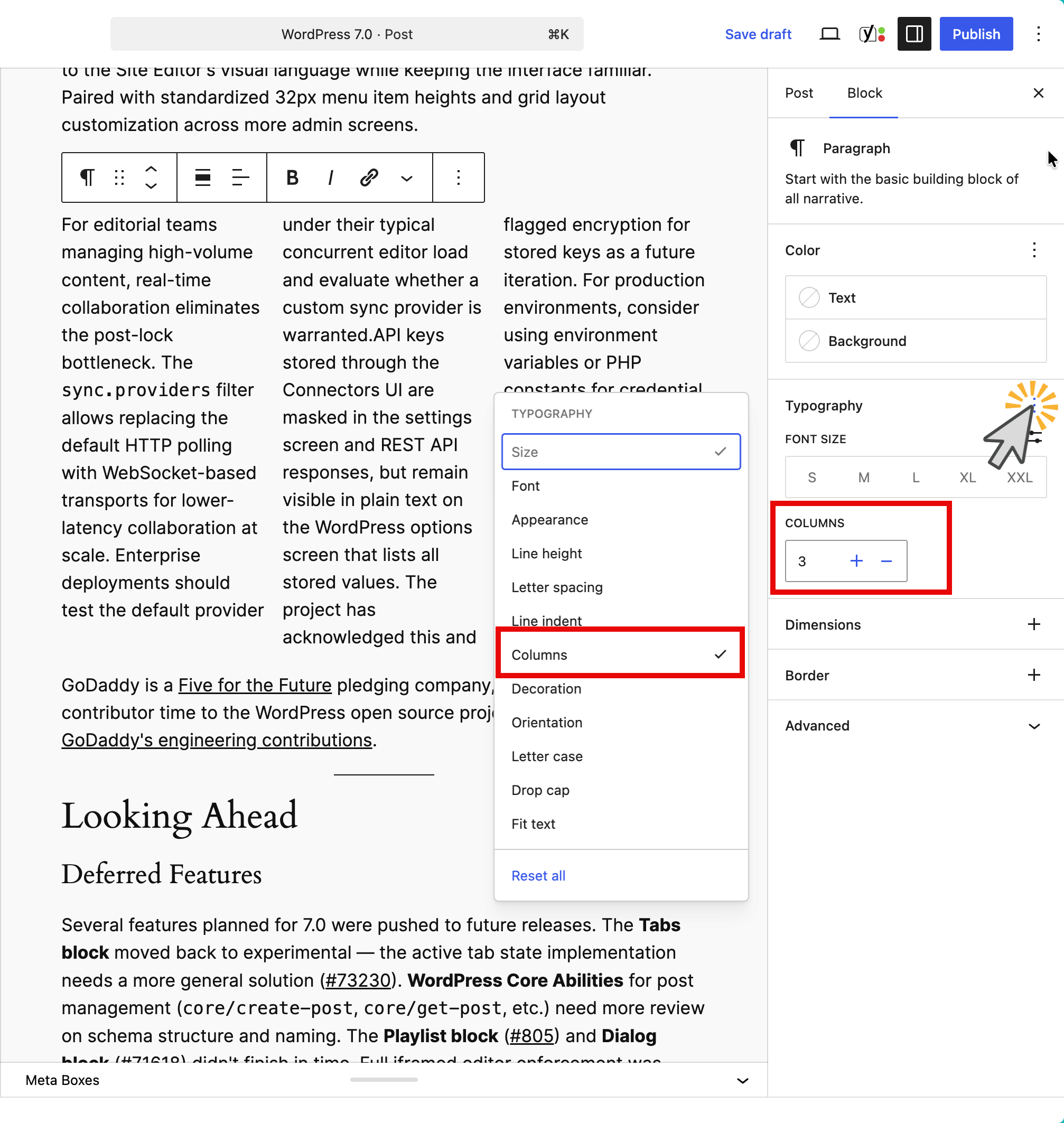
The Paragraph block gains multi-column text support and first-line indent. List View now shows full block titles and actual list item content instead of truncated labels.
A new in-editor image cropper (PR #72414) lets you crop images directly inside the block editor without switching to the media library.
Heading levels (H1–H6) now appear as individual variations in the block inserter and slash command, so you can insert an H3 directly instead of inserting a heading and then changing the level.
You can now define
The new capability: pseudo-selectors on block style variations, not just elements. Here’s what that looks like for a button variation:
{
"styles": {
"blocks": {
"core/button": {
"variations": {
"outline": {
":hover": {
"color": { "background": "#1e40af", "text": "#ffffff" }
}
}
}
}
}
}
}
This is a
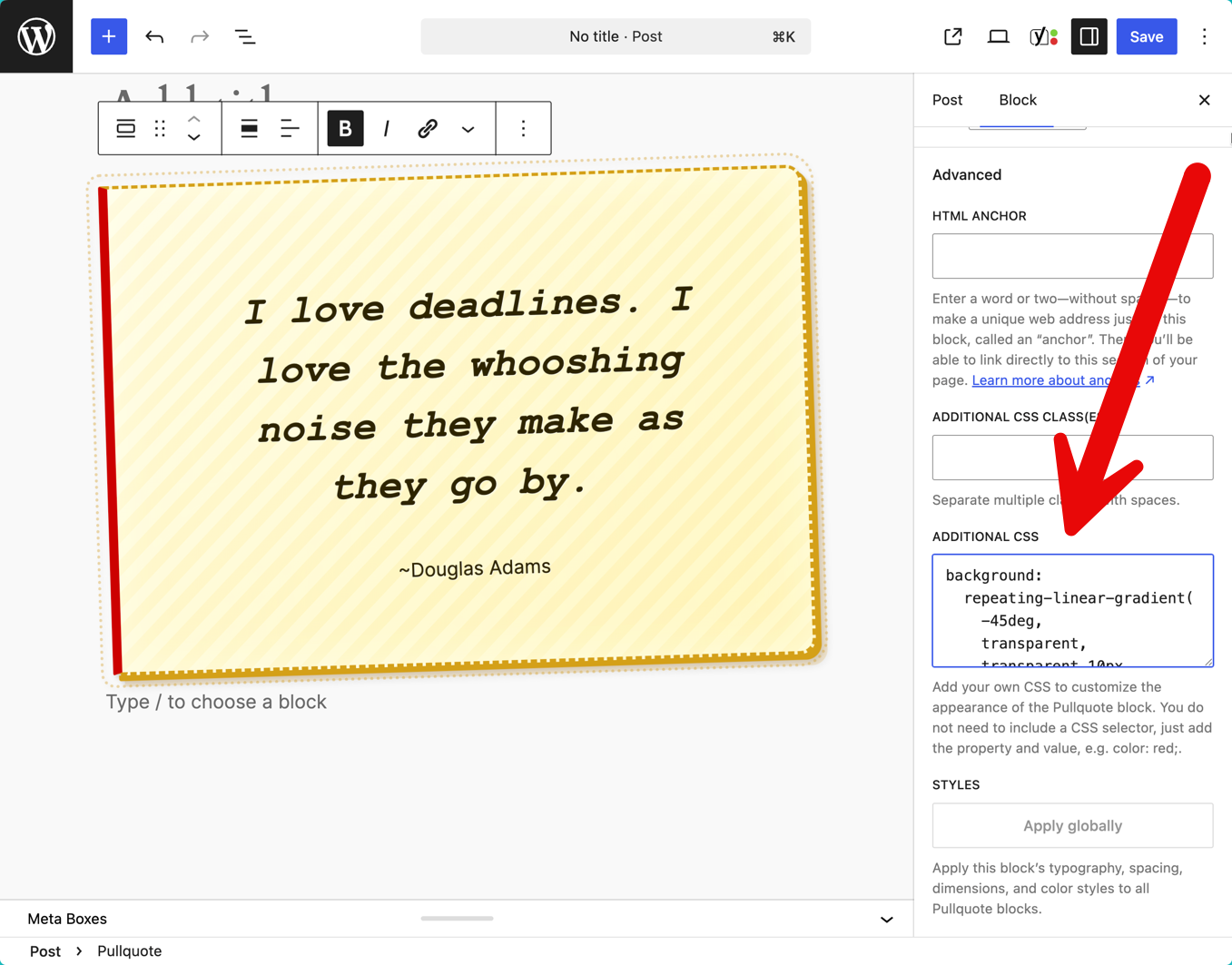
Individual block instances can now receive custom CSS via Advanced → Additional CSS in the block sidebar. A
The Grid block now allows Minimum column width and Columns controls to work simultaneously — the previous either/or toggle between Auto and Manual modes is gone. This gives theme authors finer control over responsive grid behavior without custom CSS overrides.
The Dedicated Fonts page centralizes typography management under Appearance, replacing scattered font controls. Cover blocks now support video embeds as backgrounds and focal point controls for fixed backgrounds. Image blocks gain aspect ratio controls at wide and full alignment. Height block support adds a new dimension tool. Heading and Verse blocks gain full
Three changes to know about. The new
The
import { store, watch } from '@wordpress/interactivity';
const { state } = store( 'core/router' );
watch( () => {
sendAnalyticsPageView( state.url );
} );
Pattern Overrides allow content blocks within synced patterns to be overridden per-instance via the block bindings API. If you’re building patterns for client sites that need instance-specific content (like a CTA pattern where the heading changes per page), this is the mechanism. Tracking issue: #64870.
Full iframe enforcement is not happening in 7.0 — the timeline was revised for a gradual rollout. What did change: the post editor now checks Block API versions of blocks actually inserted in the post, not all registered blocks across all plugins (PR #75187). If every inserted block uses API version 3+, the editor iframes; otherwise, it falls back. The separate Gutenberg plugin (version 22.6+) enforces iframing for classic themes to gather early feedback, but WordPress 7.0 core does not. Start upgrading your blocks to API version 3 now — the migration guide is available. See the iframed editor dev note.
Blocks can now be registered entirely in PHP with full metadata support passed to the client — no
The WP AI Client ships a provider-agnostic AI interface in core. The PHP function
$response = wp_ai_client_prompt( 'Summarize this post for social media.' )
->using_model_preference( 'claude-sonnet-4-5', 'gemini-3-pro-preview' )
->generate_text();
A JavaScript counterpart via
Connectors UI at Settings > Connectors provides a centralized dashboard for managing AI provider credentials. API keys are masked in the UI and REST responses. Provider plugins for OpenAI, Anthropic, and Google are available on WordPress.org, with community providers for Grok and OpenRouter already appearing.
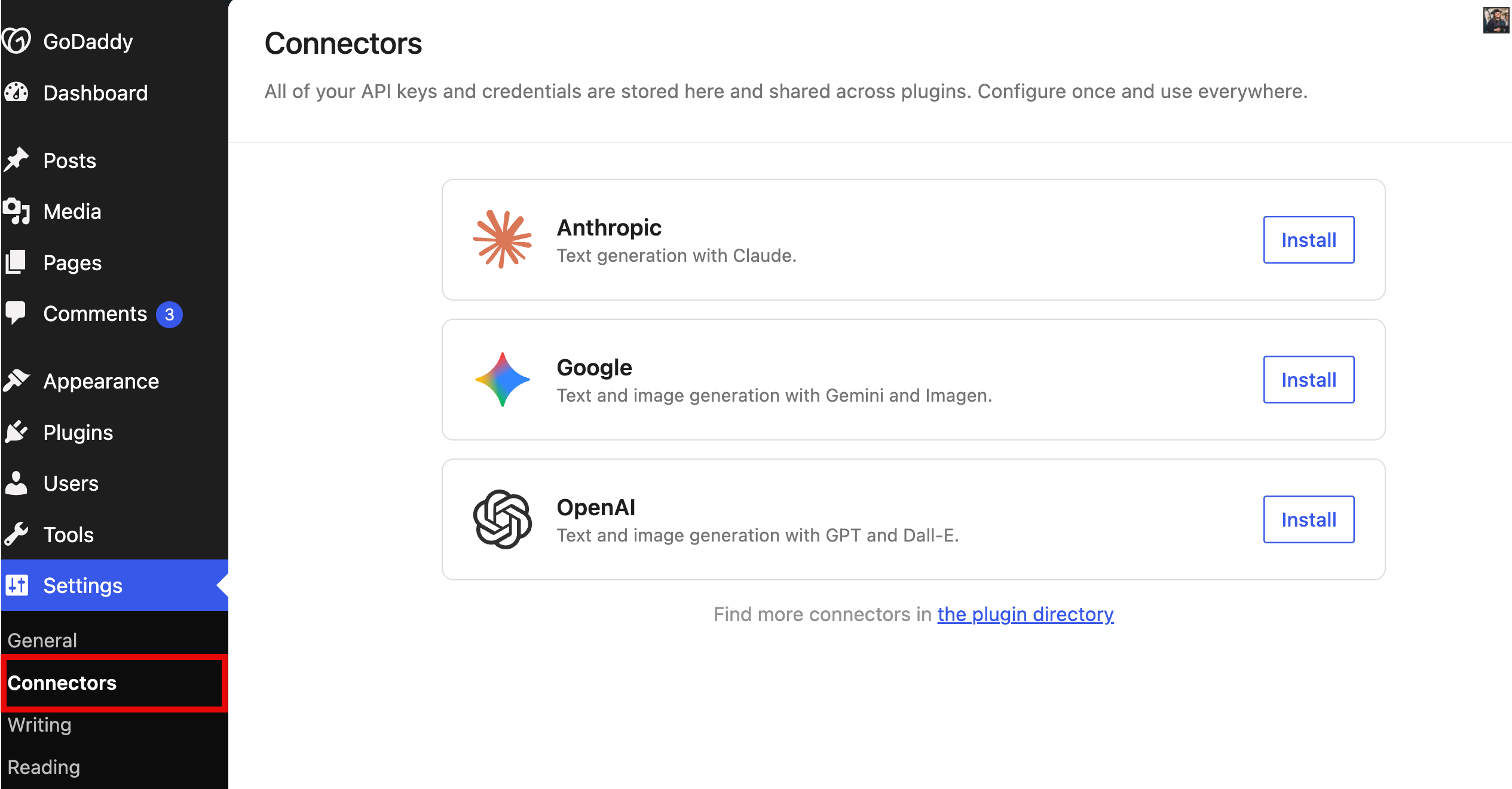
What it does not do: The WP AI Client does not ship providers, auto-enable API calls, or add AI buttons to the editor. It provides infrastructure. No data is sent to external services without explicit code requesting it.
Agency context: If you’re building AI-powered features for client sites, this means you can code against a single API and let site admins choose their provider. No more vendor-locked AI integrations.
The client-side Abilities API (
The DataViews/DataForm dev note documents 166 contributions by 35 authors across this cycle. Key additions: a
WordPress 7.0 raises the minimum PHP version to 7.4, up from 7.2.x. Sites on PHP 7.2 or 7.3 will be unable to update. Recommended: PHP 8.2 or later. Flag this for any clients running older hosting environments — they’ll need an upgrade before April.
The most immediately visible change for anyone who uses wp-admin daily. CSS-based cross-document view transitions replace the full-page reload flash with a smooth fade between admin screens. Supported in Chrome, Edge, and Safari; browsers without support fall back to standard navigation with no disruption. Respects
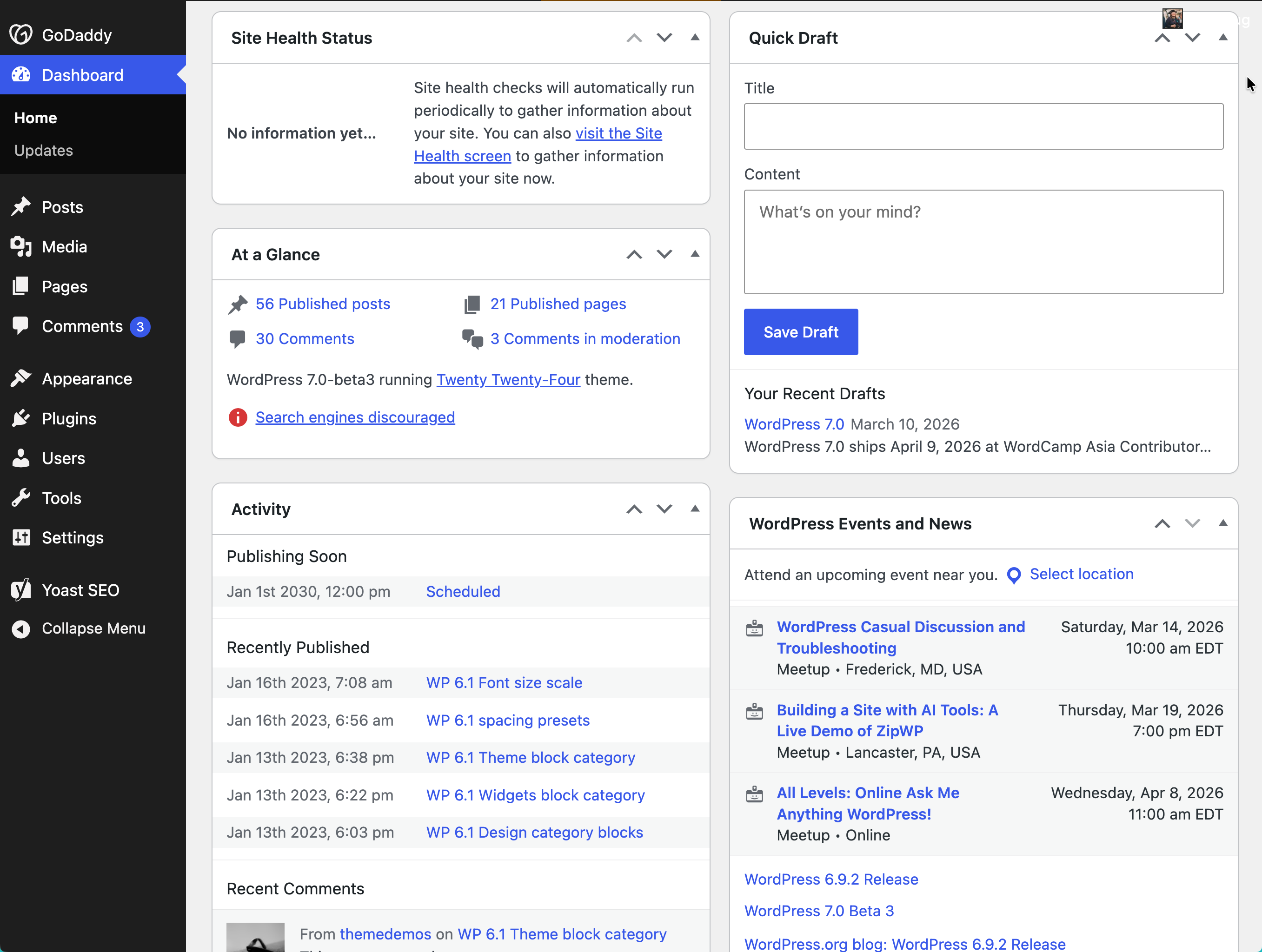
WordPress 7.0 introduces a fresh default color scheme and cleaner dashboard styles. These are CSS-level changes that bring wp-admin closer to the Site Editor’s visual language while keeping the interface familiar. Paired with standardized 32px menu item heights and grid layout customization across more admin screens.
For editorial teams managing high-volume content, real-time collaboration eliminates the post-lock bottleneck. The
API keys stored through the Connectors UI are masked in the settings screen and REST API responses, but remain visible in plain text on the WordPress options screen that lists all stored values. The project has acknowledged this and flagged encryption for stored keys as a future iteration. For production environments, consider using environment variables or PHP constants for credential loading — the AI client supports both.
GoDaddy engineers contributed to WordPress 7.0 across core, the block editor, and related packages. Contributors and their roles will be listed here upon release.
GoDaddy is a Five for the Future pledging company, committing sponsored contributor time to the WordPress open source project. Learn more about GoDaddy’s engineering contributions.
Several features planned for 7.0 were pushed to future releases. The Tabs block moved back to experimental — the active tab state implementation needs a more general solution (#73230). WordPress Core Abilities for post management (
If you’ve been waiting on any of these for a client project, plan accordingly — the Tabs block and Core Abilities are the most likely candidates for 7.1.
WordPress 7.1 targets August 19, 2026, aligned with WordCamp US. Expect continued iteration on collaboration tools, the post management abilities that were deferred from 7.0, and further DataViews extensibility. The three-release cadence continues through 7.2 in December, timed to State of the Word.
The post WordPress 7.0: Real-Time Collaboration Arrives in Core appeared first on GoDaddy Blog.
Continue reading...
Test WordPress 7.0 before you deploy
If you manage client sites, this one matters. Real-time collaboration changes how post locking works. Viewport-based block visibility adds a new content control layer. The iframed editor’s detection logic has shifted. Pattern editing defaults have changed.
Set up a staging environment and run your standard client workflows against the 7.0 beta before rolling it out. Pay special attention to any plugins that use classic meta boxes (collaboration disables itself when those are present), custom blocks that haven’t updated to Block API version 3, and any patterns you’ve built for client sites.
If your agency runs on GoDaddy Managed WordPress Hosting, you can deploy WordPress 7.0 betas directly to your staging site — no plugins or local setup needed. From the Hub, open your site’s Settings tab and use the WordPress version selector on your staging environment to switch to 7.0-beta3 (or the latest available beta/RC). Your production site stays untouched while you test.
For other hosting setups, install the WordPress Beta Tester plugin on a staging or local site.
You can also spin up an instant test environment at playground.wordpress.net/release — that build comes pre-loaded with testing plugins and sample content so you can start exercising 7.0 features immediately. The official Help Test WordPress 7.0 post has specific testing scenarios.
What does this update bring to end users?
Real-time collaboration
Multiple users can edit the same post at the same time, with changes syncing in real time. The implementation uses Yjs for conflict-free data merging, with an HTTP polling sync provider shipping by default.
For agencies, the practical shift is this: posts no longer lock when a second editor opens them. Instead, both editors see each other’s changes live. This is opt-in during the beta period to allow broader testing. The real-time collaboration dev note covers the technical architecture, plugin compatibility guidance, and the
sync.providers filter for custom transport layers.
One critical caveat: Classic meta boxes are not synced. If a post has meta boxes present, collaboration disables itself and falls back to standard post locking. Developers should migrate meta box functionality to registered post meta with
show_in_rest set to true.If you need to disable collaboration entirely — during a phased rollout across client sites, for example — the
sync.providers filter is the kill switch:import { addFilter } from '@wordpress/hooks';
addFilter( 'sync.providers', 'my-plugin/disable-collab', () => [] );
Notes improvements
WordPress 6.9 introduced Notes — block-level comments that let editorial teams leave contextual feedback directly on content inside the editor. Notes never appear on the frontend. You can reply in threads, resolve conversations, and keep review workflows inside WordPress instead of routing them through email or external tools. The Notes documentation covers setup and permissions.
WordPress 7.0 hardens the Notes foundation with reliability fixes. The most visible addition: email notifications now fire when someone adds a note to a post you authored, keeping asynchronous review workflows moving even when collaborators aren’t in the editor at the same time. Other fixes prevent notes from incorrectly incrementing the post’s comment count or appearing on the Comments admin screen.
Visual revisions
The revisions interface gets a full rethink. Instead of the classic comparison screen, revisions now display inline in the editor with block-level red/green diff highlighting. A sidebar banner flags where on the page changes occurred. The editor enters a distraction-free comparison mode — you can only restore or exit, no accidental edits mid-review. Tracking issue: #74742.
New blocks
Breadcrumbs block: The new Breadcrumbs block renders hierarchical navigation paths based on the current page, post, archive, or template context.
[IMG alt="Breadcrumbs block in WordPress 7.0 is a sub-navigation method
"]https://www.godaddy.com/resources/wp-content/uploads/2026/03/breadcrumbs.png[/IMG]
It supports primary category selection for multi-category posts, a filter hook for overriding the breadcrumb array, and customizable separator icons. Default styling is minimal, giving theme authors full design control. The breadcrumb block filters dev note documents two PHP filters —
block_core_breadcrumbs_items for modifying trail items and block_core_breadcrumbs_post_type_settings for taxonomy control:add_filter( 'block_core_breadcrumbs_items', function( $items ) {
// Replace "Home" label with a custom site name
$items[0]['label'] = 'My Agency Site';
return $items;
} );
Icon block: The new Icon block ships with a default set from the
wordpress/icons package, plus an extensibility API for registering custom icon sets.
It fills a long-standing gap — previously, adding icons to content required custom HTML blocks or third-party plugins. Tracking issue: #16484.
Gallery lightbox
The Gallery block now supports a lightbox overlay with image-to-image navigation. Click any gallery image to open it full-screen, then navigate between images with keyboard or pointer. Tracking issue: #56310.
Pattern editing changes
This one requires attention. Unsynced patterns and template parts now default to content-only mode when inserted into the editor. You can edit text and media, but the block structure and style controls are hidden by default. This prevents accidental layout changes — a common pain point — but it’s a behavioral shift from previous versions where users had full block access. An “Edit section” button provides access to the full structure when needed. See the call for testing.
Unsynced patterns
Synced patterns/template parts
Other editor improvements
The Navigation block’s mobile overlay — the hamburger menu — is now a template part you can edit with blocks and patterns. Add branding, calls-to-action, images, or custom styling directly inside the overlay using the same tools you use for the rest of the site. Themes can ship their own overlay variations, and agencies can build client-specific mobile menus without custom code.
An overlay template part selector in the Navigation block settings lets you choose which template part powers the mobile menu. Because overlays are saved as template parts, changes apply site-wide — update once, deploy everywhere. The customizable navigation overlays dev note covers the full implementation.
Viewport-based block visibility lets you show or hide any block by screen size — the control lives under the block toolbar, block inspector sidebar, and command palette. The viewport-hidden blocks are rendered in the DOM with CSS hiding,
The Paragraph block gains multi-column text support and first-line indent. List View now shows full block titles and actual list item content instead of truncated labels.
A new in-editor image cropper (PR #72414) lets you crop images directly inside the block editor without switching to the media library.
Heading levels (H1–H6) now appear as individual variations in the block inserter and slash command, so you can insert an H3 directly instead of inserting a heading and then changing the level.
What does this update bring to theme authors?
Pseudo-element support in theme.json
You can now define
:hover, :focus, :focus-visible, and :active states directly on blocks and block style variations in theme.json. Previously, interactive states were only available for elements like button and link. This means an “Outline” button variation can have entirely different hover colors than the default button style — all declared in theme.json, no custom CSS needed.The new capability: pseudo-selectors on block style variations, not just elements. Here’s what that looks like for a button variation:
{
"styles": {
"blocks": {
"core/button": {
"variations": {
"outline": {
":hover": {
"color": { "background": "#1e40af", "text": "#ffffff" }
}
}
}
}
}
}
}
This is a
theme.json-only API for now — no Global Styles UI for these states ships in 7.0. UI work is tracked at #38277. The pseudo-element support dev note has the full schema.Custom CSS per block
Individual block instances can now receive custom CSS via Advanced → Additional CSS in the block sidebar. A
.has-custom-css class is added automatically in both the editor and frontend. This is scoped to the single block instance — it won’t affect other blocks of the same type. Useful for one-off client requests without polluting global styles.
Responsive grid block
The Grid block now allows Minimum column width and Columns controls to work simultaneously — the previous either/or toggle between Auto and Manual modes is gone. This gives theme authors finer control over responsive grid behavior without custom CSS overrides.
Other theme-relevant changes
The Dedicated Fonts page centralizes typography management under Appearance, replacing scattered font controls. Cover blocks now support video embeds as backgrounds and focal point controls for fixed backgrounds. Image blocks gain aspect ratio controls at wide and full alignment. Height block support adds a new dimension tool. Heading and Verse blocks gain full
textAlign support.What does this update bring to plugin authors?
Interactivity API changes
Three changes to know about. The new
watch() function provides a programmatic API for subscribing to reactive state changes outside the DOM — useful for logging, analytics, and cross-store synchronization. state.navigation in core/router is deprecated (it was always internal); accessing it triggers a deprecation warning in SCRIPT_DEBUG mode, with an official replacement coming in 7.1. And state.url is now server-populated instead of client-initialized, enabling reliable client-side navigation tracking from the first page load. The Interactivity API dev note has implementation details.The
watch() + server-populated state.url combination is particularly useful for analytics — tracking virtual page views on sites using client-side navigation:import { store, watch } from '@wordpress/interactivity';
const { state } = store( 'core/router' );
watch( () => {
sendAnalyticsPageView( state.url );
} );
Block bindings: Pattern Overrides
Pattern Overrides allow content blocks within synced patterns to be overridden per-instance via the block bindings API. If you’re building patterns for client sites that need instance-specific content (like a CTA pattern where the heading changes per page), this is the mechanism. Tracking issue: #64870.
Iframed editor: What actually changed
Full iframe enforcement is not happening in 7.0 — the timeline was revised for a gradual rollout. What did change: the post editor now checks Block API versions of blocks actually inserted in the post, not all registered blocks across all plugins (PR #75187). If every inserted block uses API version 3+, the editor iframes; otherwise, it falls back. The separate Gutenberg plugin (version 22.6+) enforces iframing for classic themes to gather early feedback, but WordPress 7.0 core does not. Start upgrading your blocks to API version 3 now — the migration guide is available. See the iframed editor dev note.
PHP-only block registration
Blocks can now be registered entirely in PHP with full metadata support passed to the client — no
block.json JavaScript build step required, and inspector controls are auto-generated from registered attributes. For agency teams where the PHP developers outnumber the JS-build-toolchain-comfortable ones, this is a practical shift: your back-end dev can now build a simple client-specific block (office hours, custom post type card, location details) without touching Node, webpack, or a build/ directory — the kind of block you’d previously solve with a shortcode because the block scaffolding overhead wasn’t worth it for a single client.What does this update bring to developers?
WP AI Client and Connectors
The WP AI Client ships a provider-agnostic AI interface in core. The PHP function
wp_ai_client_prompt() supports method chaining for system instructions, file attachments, model preferences with fallbacks, structured JSON responses, and text generation:$response = wp_ai_client_prompt( 'Summarize this post for social media.' )
->using_model_preference( 'claude-sonnet-4-5', 'gemini-3-pro-preview' )
->generate_text();
A JavaScript counterpart via
@wordpress/abilities mirrors the server-side API.Connectors UI at Settings > Connectors provides a centralized dashboard for managing AI provider credentials. API keys are masked in the UI and REST responses. Provider plugins for OpenAI, Anthropic, and Google are available on WordPress.org, with community providers for Grok and OpenRouter already appearing.
What it does not do: The WP AI Client does not ship providers, auto-enable API calls, or add AI buttons to the editor. It provides infrastructure. No data is sent to external services without explicit code requesting it.
Agency context: If you’re building AI-powered features for client sites, this means you can code against a single API and let site admins choose their provider. No more vendor-locked AI integrations.
Abilities API and MCP Adapter
The client-side Abilities API (
@wordpress/abilities) ships as a stable package for discovering and executing WordPress capabilities. The MCP Adapter bridges these abilities to the Model Context Protocol, letting AI coding assistants like Claude Code, Cursor, and VS Code interact with WordPress sites during development. Abilities marked with meta.mcp.public = true are automatically exposed through the MCP Adapter.DataViews and DataForm
The DataViews/DataForm dev note documents 166 contributions by 35 authors across this cycle. Key additions: a
format property for number/date display, expanded validation via isValid, new combobox and adaptiveSelect edit controls, a new activity layout, and the groupBy object replacing groupByField. QuickEdit in DataViews brings inline editing to list views.PHP version requirement
WordPress 7.0 raises the minimum PHP version to 7.4, up from 7.2.x. Sites on PHP 7.2 or 7.3 will be unable to update. Recommended: PHP 8.2 or later. Flag this for any clients running older hosting environments — they’ll need an upgrade before April.
What does this update bring to site admins and enterprise agencies?
View transitions in admin
The most immediately visible change for anyone who uses wp-admin daily. CSS-based cross-document view transitions replace the full-page reload flash with a smooth fade between admin screens. Supported in Chrome, Edge, and Safari; browsers without support fall back to standard navigation with no disruption. Respects
prefers-reduced-motion for accessibility. Admin-only — frontend view transitions are scoped for a future release (Trac #64471).Admin visual refresh
WordPress 7.0 introduces a fresh default color scheme and cleaner dashboard styles. These are CSS-level changes that bring wp-admin closer to the Site Editor’s visual language while keeping the interface familiar. Paired with standardized 32px menu item heights and grid layout customization across more admin screens.
Real-time collaboration at scale
For editorial teams managing high-volume content, real-time collaboration eliminates the post-lock bottleneck. The
sync.providers filter allows replacing the default HTTP polling with WebSocket-based transports for lower-latency collaboration at scale. Enterprise deployments should test the default provider under their typical concurrent editor load and evaluate whether a custom sync provider is warranted.Security note on AI Connectors
API keys stored through the Connectors UI are masked in the settings screen and REST API responses, but remain visible in plain text on the WordPress options screen that lists all stored values. The project has acknowledged this and flagged encryption for stored keys as a future iteration. For production environments, consider using environment variables or PHP constants for credential loading — the AI client supports both.
GoDaddy contributors to WordPress 7.0
GoDaddy engineers contributed to WordPress 7.0 across core, the block editor, and related packages. Contributors and their roles will be listed here upon release.
GoDaddy is a Five for the Future pledging company, committing sponsored contributor time to the WordPress open source project. Learn more about GoDaddy’s engineering contributions.
Looking beyond WordPress 7.0
Deferred features
Several features planned for 7.0 were pushed to future releases. The Tabs block moved back to experimental — the active tab state implementation needs a more general solution (#73230). WordPress Core Abilities for post management (
core/create-post, core/get-post, etc.) need more review on schema structure and naming. The Playlist block (#805) and Dialog block (#71618) didn’t finish in time. Full iframed editor enforcement was revised to a gradual rollout timeline.If you’ve been waiting on any of these for a client project, plan accordingly — the Tabs block and Core Abilities are the most likely candidates for 7.1.
What’s next
WordPress 7.1 targets August 19, 2026, aligned with WordCamp US. Expect continued iteration on collaboration tools, the post management abilities that were deferred from 7.0, and further DataViews extensibility. The three-release cadence continues through 7.2 in December, timed to State of the Word.
The post WordPress 7.0: Real-Time Collaboration Arrives in Core appeared first on GoDaddy Blog.
Continue reading...

