


- Joined
- Oct 12, 2023
- Messages
- 249
- Reaction score
- 44
Owning a domain name comes with more responsibility than many business owners expect. Beyond renewing your domain and managing your website, there are also security settings designed to help protect your online presence. One of the most important is domain locking.
If you have ever noticed a ‘registrar lock’ status in your domain dashboard, you may have wondered what it actually means. Let’s explore what domain locking is, why it exists, how it affects domain transfers, and how to unlock domain settings when needed.
A domain lock is a security feature that helps prevent unauthorized changes to a domain name. When a domain is locked, certain actions cannot happen unless the owner first removes the lock.
The most common type is a registrar lock, sometimes called a client transfer prohibited status. According to the ICANN, this status helps stop unauthorized domain transfers between registrars. In simpler terms, a locked domain acts like a safety latch on your digital front door.
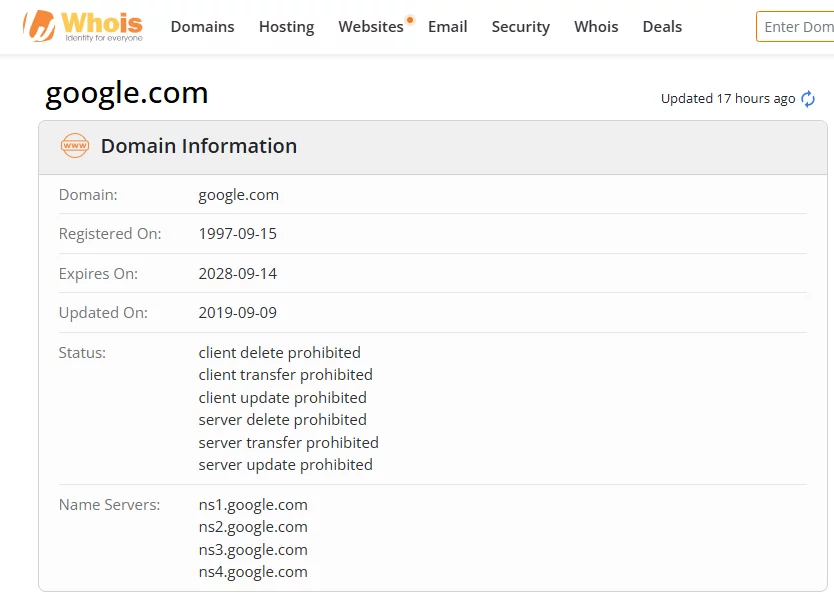
Source: Whois
For example, if a business owns bakeryhub.it.com and keeps domain locking enabled, another person cannot easily transfer that domain to a different registrar without permission. That added layer of protection matters because domain theft is a real issue. Cybercriminals sometimes target domains to redirect websites, impersonate brands, or gain access to business email systems.
A domain lock usually protects against:
Many registrars enable domain lock settings automatically when a domain is registered.
For small and medium businesses, a domain name is often tied to almost every part of online activity. Your website, email accounts, customer logins, and marketing campaigns may all depend on it.
Losing control of a domain, even temporarily, can create serious problems.
According to Verisign domain industry research, there were more than 392 million registered domains worldwide at the end of Q1 2026. As online competition grows, domains become more valuable targets for scams and account takeovers.
A registrar lock reduces the chance of someone moving your domain without authorization. It also helps protect against simple mistakes. For instance, an employee might accidentally start a transfer request or change settings they did not intend to modify.
Businesses using custom email addresses should pay especially close attention to domain security. If attackers gain control of a domain, they may also disrupt email communication connected to it.

Source: Unsplash
Not all domain locks work in exactly the same way. Registrars may use different labels or security options.
This is the standard domain lock most people encounter. It prevents unauthorized domain transfers between registrars.
You may also see this referred to as:
Many providers explain what is a domain lock as a default protection feature included with domain registration.
A registry lock is a higher-level security feature offered for some domains.
Unlike a standard registrar lock, a registry lock usually requires additional manual verification before changes can happen. Large companies, financial organizations, and brands managing high-value domains sometimes use this extra layer of protection.
Some registrars also limit changes to ownership details or contact information while a domain remains locked.
This can help prevent unauthorized updates to registration records. If you want to check ownership details, our guide can help clarify what information is publicly visible.
Most registrars display domain lock status directly in the domain management dashboard.
The wording may vary slightly, but common statuses include:
You can also check domain status using WHOIS lookup tools.
For example, if your business owns brightstudio.it.com, the WHOIS record may show a transfer protection status if domain locking is enabled.
If the domain is unlocked, transfer requests may proceed more easily.
Sometimes domain owners need to unlock a domain temporarily. This usually happens before transferring the domain to another registrar.

Source: Unsplash
Here is a typical process:
Access the account where your domain is managed.
Locate the specific domain name, such as examplebrand.it.com.
Most registrars place domain lock settings inside security tabs or transfer settings menus.
Switch the domain status from locked to unlocked.
Some registrars may ask for two-factor authentication or email confirmation before processing the change.
Once unlocked, you can request an authorization code and begin the transfer process.
After the transfer is complete, many providers recommend enabling the lock again.
A newly transferred domain is commonly locked for 60 days.
This is based on ICANN transfer policies designed to reduce fraud and unauthorized ownership changes. During this period, the domain usually cannot be transferred again between registrars.
The temporary lock does not usually stop your website, email, or DNS records from working normally.
However, it may affect future transfer requests if you plan to move registrars again quickly.

Source: Unsplash
Domain locking is only one part of managing a secure domain portfolio.
Business owners may also encounter:
Some companies also explore whether to purchase premium or already-owned domains. Before doing that, it helps to understand the process of buying a domain name someone already owns and avoid common domain buying mistakes.
Domain locking is a simple but important security feature that helps protect domains from unauthorized transfers and unwanted changes. For many businesses, it acts as a quiet safeguard working in the background every day.
Understanding how domain lock settings work can make it easier to manage transfers, protect business assets, and avoid surprises when updating domain settings in the future.
Domain locking is a security feature that helps prevent unauthorized domain transfers or changes. A locked domain usually cannot move to another registrar until the owner unlocks it first.
A domain lock adds protection to your domain name by limiting transfers and some account changes. It helps reduce the risk of domain theft, fraud, or accidental modifications.
Many domain owners keep their domains locked most of the time for security reasons. Domains are often unlocked temporarily during transfers or account updates.
Most registrars show lock status inside the domain management dashboard. You may also see statuses such as “clientTransferProhibited” in WHOIS records.
Domains are commonly locked for 60 days after a registrar transfer. This policy is designed to help reduce unauthorized transfers and fraud.
You can usually unlock a domain through your registrar account. The process often involves opening domain settings, disabling the registrar lock, and confirming the request through email or two-factor authentication.
Want to know more about domain name management for your business? Visit it.com Domains blog and follow us on social media.
Continue reading on the it.com Domains blog...
If you have ever noticed a ‘registrar lock’ status in your domain dashboard, you may have wondered what it actually means. Let’s explore what domain locking is, why it exists, how it affects domain transfers, and how to unlock domain settings when needed.
What Is a Domain Lock?
A domain lock is a security feature that helps prevent unauthorized changes to a domain name. When a domain is locked, certain actions cannot happen unless the owner first removes the lock.
The most common type is a registrar lock, sometimes called a client transfer prohibited status. According to the ICANN, this status helps stop unauthorized domain transfers between registrars. In simpler terms, a locked domain acts like a safety latch on your digital front door.
Source: Whois
For example, if a business owns bakeryhub.it.com and keeps domain locking enabled, another person cannot easily transfer that domain to a different registrar without permission. That added layer of protection matters because domain theft is a real issue. Cybercriminals sometimes target domains to redirect websites, impersonate brands, or gain access to business email systems.
A domain lock usually protects against:
- Unauthorized domain transfers
- Changes to ownership details
- Accidental deletion
- Some DNS modifications
Many registrars enable domain lock settings automatically when a domain is registered.
Why Domain Locking Matters for Businesses
For small and medium businesses, a domain name is often tied to almost every part of online activity. Your website, email accounts, customer logins, and marketing campaigns may all depend on it.
Losing control of a domain, even temporarily, can create serious problems.
According to Verisign domain industry research, there were more than 392 million registered domains worldwide at the end of Q1 2026. As online competition grows, domains become more valuable targets for scams and account takeovers.
A registrar lock reduces the chance of someone moving your domain without authorization. It also helps protect against simple mistakes. For instance, an employee might accidentally start a transfer request or change settings they did not intend to modify.
Businesses using custom email addresses should pay especially close attention to domain security. If attackers gain control of a domain, they may also disrupt email communication connected to it.
Source: Unsplash
Types of Domain Locks
Not all domain locks work in exactly the same way. Registrars may use different labels or security options.
Registrar Lock
This is the standard domain lock most people encounter. It prevents unauthorized domain transfers between registrars.
You may also see this referred to as:
- Domain transfer lock
- Client transfer prohibited
- Registrar lock
Many providers explain what is a domain lock as a default protection feature included with domain registration.
Registry Lock
A registry lock is a higher-level security feature offered for some domains.
Unlike a standard registrar lock, a registry lock usually requires additional manual verification before changes can happen. Large companies, financial organizations, and brands managing high-value domains sometimes use this extra layer of protection.
WHOIS or Contact Locks
Some registrars also limit changes to ownership details or contact information while a domain remains locked.
This can help prevent unauthorized updates to registration records. If you want to check ownership details, our guide can help clarify what information is publicly visible.
How to Tell If Your Domain Is Locked
Most registrars display domain lock status directly in the domain management dashboard.
The wording may vary slightly, but common statuses include:
- Locked
- Registrar Lock Enabled
- Transfer Lock Active
- ClientTransferProhibited
You can also check domain status using WHOIS lookup tools.
For example, if your business owns brightstudio.it.com, the WHOIS record may show a transfer protection status if domain locking is enabled.
If the domain is unlocked, transfer requests may proceed more easily.
How to Unlock a Domain Step by Step
Sometimes domain owners need to unlock a domain temporarily. This usually happens before transferring the domain to another registrar.
Source: Unsplash
Here is a typical process:
Step 1: Log into your registrar account
Access the account where your domain is managed.
Step 2: Find the domain management section
Locate the specific domain name, such as examplebrand.it.com.
Step 3: Open security or transfer settings
Most registrars place domain lock settings inside security tabs or transfer settings menus.
Step 4: Disable the registrar lock
Switch the domain status from locked to unlocked.
Some registrars may ask for two-factor authentication or email confirmation before processing the change.
Step 5: Complete the transfer if needed
Once unlocked, you can request an authorization code and begin the transfer process.
After the transfer is complete, many providers recommend enabling the lock again.
Why Domains Are Often Locked after Transfer
A newly transferred domain is commonly locked for 60 days.
This is based on ICANN transfer policies designed to reduce fraud and unauthorized ownership changes. During this period, the domain usually cannot be transferred again between registrars.
The temporary lock does not usually stop your website, email, or DNS records from working normally.
However, it may affect future transfer requests if you plan to move registrars again quickly.
Source: Unsplash
Domain Locking and Other Domain Management Features
Domain locking is only one part of managing a secure domain portfolio.
Business owners may also encounter:
- Auto-renew settings
- WHOIS privacy protection
- Two-factor authentication
- Custom DNS management
- Domain forwarding
- Domain parking services
Some companies also explore whether to purchase premium or already-owned domains. Before doing that, it helps to understand the process of buying a domain name someone already owns and avoid common domain buying mistakes.
Domain locking is a simple but important security feature that helps protect domains from unauthorized transfers and unwanted changes. For many businesses, it acts as a quiet safeguard working in the background every day.
Understanding how domain lock settings work can make it easier to manage transfers, protect business assets, and avoid surprises when updating domain settings in the future.
FAQs
What is domain locking?
Domain locking is a security feature that helps prevent unauthorized domain transfers or changes. A locked domain usually cannot move to another registrar until the owner unlocks it first.
What does locking your domain do?
A domain lock adds protection to your domain name by limiting transfers and some account changes. It helps reduce the risk of domain theft, fraud, or accidental modifications.
Should my domain be locked or unlocked?
Many domain owners keep their domains locked most of the time for security reasons. Domains are often unlocked temporarily during transfers or account updates.
How do I tell if my domain is locked?
Most registrars show lock status inside the domain management dashboard. You may also see statuses such as “clientTransferProhibited” in WHOIS records.
How long is a domain locked after transfer?
Domains are commonly locked for 60 days after a registrar transfer. This policy is designed to help reduce unauthorized transfers and fraud.
How do I unlock my domain?
You can usually unlock a domain through your registrar account. The process often involves opening domain settings, disabling the registrar lock, and confirming the request through email or two-factor authentication.
Want to know more about domain name management for your business? Visit it.com Domains blog and follow us on social media.
Continue reading on the it.com Domains blog...



